Introduction
According to a Gartner study, 60% of AI projects will be abandoned through 2026 due to a lack of "AI-ready data." The culprit isn't the AI itself — it's the disconnected data silos spread across dozens of platforms that most organizations haven't solved yet.
AI tool connectors link raw data sources — databases, SaaS apps, data warehouses — directly to AI analytics platforms. Choosing the wrong one can silently undermine AI accuracy. Maxim AI's RAG evaluation guide notes that poorly configured RAG systems can produce hallucinations in up to 40% of responses, even when the underlying data is correct.
This guide covers the best AI tool connectors in 2026, what makes each suitable for AI-driven workflows, and how to evaluate them for your stack — so you can stop guessing and start connecting.
Key Takeaways
- AI tool connectors move and structure data so AI analytics platforms can generate accurate, insights
- The best options in 2026 span managed ELT (Fivetran), open-source pipelines (Airbyte), transformation layers (dbt Cloud), no-code automation (Zapier), and AI agent integration (Merge)
- Key selection criteria: data source coverage, transformation depth, real-time sync, security/compliance, and AI-readiness
- Governed, well-structured connectors produce higher-quality AI outputs than raw, uncleaned data piped directly into models
What Are AI Tool Connectors and Why Do They Matter in 2026?
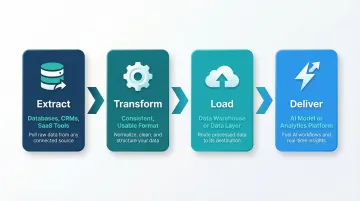
AI tool connectors are software components that sit between your data sources and your AI or analytics platform. They handle four core tasks:
- Extract data from source systems — databases, CRMs, ad platforms, SaaS tools
- Transform it into a consistent, usable format
- Load it into a destination warehouse or data layer
- Deliver clean, structured data to the AI model or analytics platform consuming it
Without reliable connectors, AI workflows stall at the data access step before any analysis begins.
Data quality determines AI output quality. Models queried against stale, mismatched, or incomplete data produce unreliable recommendations — and the financial stakes are real. IBM research found that more than a quarter of organizations estimate annual losses exceeding $5 million due to poor data quality.
The organizational side is just as stark. An IBM Institute for Business Value study of 1,700 Chief Data Officers found that 83% say data silos hinder innovation and block real-time analytics.
With dozens of connectors on the market in 2026, the list below focuses on those best suited for powering AI-driven data analysis, not just raw data movement.
Best AI Tool Connectors & Integrations in 2026
Tools were evaluated on connector breadth, AI-readiness, data transformation capability, security posture, and real-world suitability for data teams at startups and enterprises alike.
Fivetran
Fivetran is a fully managed, cloud-native ELT platform with 700+ pre-built connectors designed to automate data ingestion from SaaS apps, databases, and streaming sources directly into cloud data warehouses with minimal engineering overhead.
Why it stands out for AI workflows: Automated schema drift handling means AI pipelines don't break when upstream APIs change. Native dbt Core integration allows teams to orchestrate transformations in the same environment. Its reliability and low-maintenance footprint make it a strong choice for data teams who want clean warehouse data powering their AI tools without constant pipeline babysitting. Gartner Peer Insights reviewers rate Fivetran 4.6/5 for reliability and automated schema management.
| Attribute | Details |
|---|---|
| Best For | Automating data ingestion with minimal setup or engineering overhead |
| Key Features | 700+ pre-built connectors, automated schema drift handling, native dbt integration, low-code interface |
| Pricing | Consumption-based (Monthly Active Rows); free and paid plans available |
Airbyte
Airbyte is an open-source data movement platform built for ELT workflows, offering a large library of community-maintained connectors and a Connector Development Kit (CDK) that allows teams to build custom connectors for non-standard or proprietary data sources.
Why it stands out for AI workflows: Self-hosted deployment gives data teams full control over where data lives before it reaches an AI tool—critical for regulated industries. Support for vector database integrations (Pinecone, Weaviate, Milvus, Chroma, Qdrant) and unstructured data handling reflects its growing focus on AI-native use cases. Ideal for teams with engineering resources who want flexibility without tying their stack to a single vendor. Airbyte supports sub-5-minute CDC on Plus, Pro, and Enterprise tiers to keep vector databases fresh.
| Attribute | Details |
|---|---|
| Best For | Teams needing open-source connectors and self-hosted control over data pipelines |
| Key Features | Open-source CDK for custom connectors, vector database support, batch and near-real-time sync, self-hosted option |
| Pricing | Free for self-hosted; consumption-based for cloud; capacity-based for enterprise |
dbt Cloud
dbt Cloud is a managed transformation platform that applies software engineering principles—version control, testing, and documentation—to SQL-based data models inside cloud data warehouses. It serves as the "T" layer that shapes raw ingested data into AI-ready, semantically consistent datasets.
Why it stands out for AI workflows: By building and documenting data models in dbt, teams create a governed semantic layer—structured definitions of metrics, dimensions, and business logic—that AI analytics platforms can ground their analysis in, cutting hallucination risk and improving answer accuracy.
Gartner predicts that by 2030, universal semantic layers will be treated as critical infrastructure. This governed context approach is especially powerful when combined with AI tools built to query dbt models directly.
| Attribute | Details |
|---|---|
| Best For | Teams managing SQL-based data transformations with version control, testing, and governance |
| Key Features | Semantic layer / governed context, dbt documentation, testing framework, managed IDE and scheduling |
| Pricing | Open-source dbt Core is free; dbt Cloud offers free and paid tiers based on seats and features |
Zapier
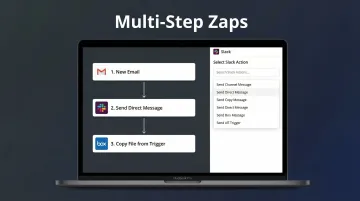
Zapier is a no-code workflow automation platform that connects 8,000+ apps through "Zaps" (trigger-action workflows), making it the fastest way to route data between marketing tools, CRMs, AI platforms, and communication apps without writing any code.
Why it stands out for AI workflows: Zapier's native integrations with OpenAI, ChatGPT, Google Gemini, and dozens of AI tools allow non-technical teams to build lightweight AI-data pipelines in minutes. Common use cases include sending form submissions to an AI summarizer, pushing CRM updates to a reporting tool, or triggering AI-generated alerts. Best suited for smaller data volumes and event-driven workflows rather than large-scale analytical pipelines.
| Attribute | Details |
|---|---|
| Best For | Non-technical teams building lightweight, event-driven connections between AI tools and business apps |
| Key Features | 8,000+ app integrations, native AI platform connectors, no-code interface, multi-step Zaps |
| Pricing | Free tier available; paid plans scale with task volume starting at $19.99/mo |
Merge
Merge is an AI agent integration platform that provides a Unified API layer giving AI agents and products access to hundreds of third-party tools—covering HRIS, ATS, CRM, accounting, ticketing, and file storage categories—through a single, normalized API connection instead of building each integration separately.
Why it stands out for AI workflows: As AI agents increasingly need to read from and write to enterprise systems to take autonomous action, Merge abstracts the complexity of maintaining individual API integrations.
Its Agent Handler product manages tool calls and API interactions for AI agents directly, making it a strong choice for engineering teams building AI-native products that need to pull live business data. SOC 2 and ISO 27001 compliant.
| Attribute | Details |
|---|---|
| Best For | Engineering teams building AI agents or products that need normalized access to enterprise SaaS data |
| Key Features | Unified API across 200+ integrations, Agent Handler for tool-call management, HRIS/CRM/ATS/accounting coverage, compliance certifications |
| Pricing | Tiered plans; Launch at $650/mo, contact sales for enterprise pricing |
How We Chose the Best AI Tool Connectors
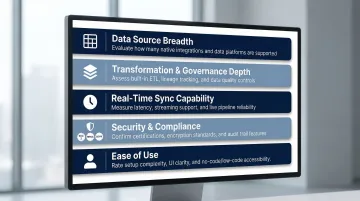
The selection process prioritized tools with proven AI-workflow suitability—not just general-purpose ETL capability—with evaluation across five dimensions:
- Data source and destination breadth
- Transformation and governance depth
- Real-time or near-real-time sync capability
- Security and compliance posture (SOC 2, HIPAA, GDPR)
- Ease of use for both technical and non-technical team members
The most common mistake teams make is choosing based on connector count alone, without validating whether the tool delivers clean, structured, and consistently updated data. Even the best AI analytics platform produces poor outputs if the underlying data is stale, mismatched, or semantically inconsistent.
For AI-specific use cases, governed transformation layers (like dbt) and tools that enforce semantic consistency are essential. Raw data movement is necessary — but it's not sufficient for reliable AI-driven analysis.
Conclusion
The right AI tool connector isn't the one with the most integrations — it's the one that delivers clean, governed, consistently refreshed data to the AI layer your team depends on. Poor alignment at the connector level compounds directly into unreliable outputs when it matters most.
Audit your current data stack before choosing a connector: map your sources and destinations, assess your team's engineering capacity, and prioritize tools with strong transformation and governance support rather than defaulting to the biggest brand name.
Once your connectors are in place, Sylus sits on top of your data stack as the AI analyst layer. It's built for teams that need answers fast without compromising on governance or security:
- Connects to 500+ data sources and grounds all analysis in your dbt models and documentation
- Lets your team ask questions in plain English and returns dashboards, charts, and reports in seconds
- SOC 2 Type II and HIPAA compliant, with self-hosted deployment available
- Built for both fast-growing startups and enterprise data teams
Frequently Asked Questions
What is the difference between an AI tool connector and a traditional ETL tool?
Traditional ETL tools focus on moving and transforming data between systems for storage or reporting. AI tool connectors are increasingly designed with AI-readiness in mind—supporting vector database outputs, semantic layers, and real-time data freshness that AI models require for accurate inference.
Do I need coding skills to use AI tool connectors?
It depends on the tool. Platforms like Zapier and Fivetran are low-code or no-code, while Airbyte and dbt require SQL or Python skills. Match tool complexity to your team's engineering capacity.
How do AI tool connectors handle data security and compliance?
Leading connectors offer SOC 2 Type II, HIPAA, and GDPR compliance, with encryption in transit and at rest, role-based access controls, and audit logging. Teams in regulated industries should verify whether self-hosted deployment is available for full data control.
Can AI tool connectors work with real-time data?
Some connectors support continuous or near-real-time sync — Fivetran's streaming connectors and Airbyte's near-real-time mode are two examples. Others run on scheduled batch intervals. The right choice depends on how time-sensitive your AI analytics use case is.
What is a semantic layer and why does it matter for AI integrations?
A semantic layer (as built by dbt) defines consistent business logic, metric definitions, and data relationships that AI tools can reference. This prevents conflicting definitions and grounds AI-generated analysis in verified, governed data rather than raw tables.
How many connectors does my team actually need?
Most teams start by mapping their three to five highest-priority data sources (such as a CRM, product database, and ad platform) and choosing a connector that handles those reliably. Breadth of connector libraries only matters if those connectors are well-maintained and production-grade.