Introduction
In cloud infrastructure and data pipelines alike, a missed alert or delayed report can turn a minor issue into a costly outage or a missed business decision. Over 90% of organizations estimate their downtime costs exceed $300,000 per hour, with 54% reporting their most recent significant outage cost over $100,000.
IT alerting and reporting software serve distinct but complementary roles: one tells you when something breaks, the other shows how your systems perform over time. The best teams use both. In 2026, AI-native tools are converging these categories — spike detection, anomaly alerts, and auto-generated narrative reports are now available in a single platform. This guide compares the top tools so you can find the right fit for your team.
Key Takeaways
- IT alerting software monitors systems in real time and routes notifications to the right people — reporting tools handle data collection and deliver scheduled dashboards automatically
- Top platforms in 2026 combine spike alerts, anomaly detection, AI-generated reports, and scheduling in a single tool
- Top tools for 2026: Sylus, PagerDuty, UptimeRobot, Datadog, and Opsgenie
- Key selection criteria: alert reliability, noise reduction, integration depth, reporting flexibility, pricing model
What Is IT Alerting & Reporting Software?
IT alerting software continuously monitors infrastructure, applications, or data pipelines and triggers notifications when predefined conditions are breached—downtime, latency spikes, or exceeded thresholds. In short, monitoring surfaces the signal; alerting turns it into action.
IT reporting software automatically collects, processes, and delivers data insights on a scheduled or event-driven basis, covering system health dashboards to AI-generated business summaries sent via email or Slack.
These two categories were once distinct—but that's changing. Gartner predicts that by 2026, 30% of enterprises will automate more than half of their network activities, while Forrester forecasts tech leaders will triple their adoption of AIOps platforms to automatically remediate incidents and reduce technical debt. Platforms now bundle spike detection, anomaly alerts, and auto-generated narrative reports under one roof—the gap between alerting and reporting is closing fast.
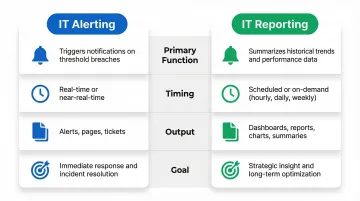
Here's how the two functions differ at a glance:
| IT Alerting | IT Reporting | |
|---|---|---|
| Primary function | Triggers notifications on threshold breaches | Delivers scheduled or on-demand data summaries |
| Timing | Real-time or near-real-time | Scheduled, periodic, or event-driven |
| Output | Alerts, pages, tickets | Dashboards, digests, narrative reports |
| Goal | Immediate response | Ongoing visibility and trend analysis |
Best IT Alerting & Reporting Software in 2026
Tools were evaluated on alert reliability, reporting depth, integration ecosystem, ease of use, pricing transparency, and suitability across team sizes.
Sylus
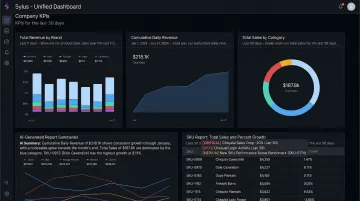
Sylus is an AI-powered analytics platform built for data teams and business users who need to query data in plain English, generate dashboards, and receive spike alerts. It combines IT reporting and real-time anomaly alerting in one platform, making it a natural fit for modern data-heavy organizations.
Key differentiators:
- Receive alerts when there are spikes in activity
- Schedule AI-generated reports and summaries to email or Slack
- Query data directly from Slack with instant visualizations
- Unlimited seats with usage-based pricing
- SOC 2 Type II and HIPAA compliant
- Governed context via dbt models ensures analysis grounded in your data definitions
| Feature | Details |
|---|---|
| Key Features | AI-generated dashboards, plain-English querying, spike activity alerts, scheduled reports to email/Slack, self-hosted deployment option, governed context via dbt models |
| Pricing | Unlimited seats; usage-based pricing (contact sales for specific tiers) |
| Best For | Data teams and business users at fast-growing startups or enterprises needing AI-powered reporting + real-time anomaly alerting in one platform |
PagerDuty
PagerDuty is a widely adopted platform for enterprise incident alerting and on-call management, used by DevOps and SRE teams at large organizations for escalation workflows and incident lifecycle management. It holds a 4.5/5 rating on G2 based on 916 reviews.
Key differentiators:
- Robust on-call scheduling with advanced escalation policies
- Multi-channel alert delivery with intelligent grouping
- 700+ integrations connecting monitoring, chat, and ITSM tools
- AIOps capabilities with machine learning-powered incident correlation
- PagerDuty Advance uses generative AI to draft audience-specific status updates and summarize automation results
| Feature | Details |
|---|---|
| Key Features | On-call scheduling, escalation policies, alert grouping/noise reduction, incident analytics, AIOps capabilities, generative AI status updates |
| Pricing | Free: $0/month (up to 5 users); Professional: $21/user/month; Business: $41/user/month; Enterprise: Custom pricing |
| Best For | Enterprise DevOps and SRE teams with complex on-call rotations and compliance reporting requirements |
UptimeRobot
UptimeRobot is one of the most widely adopted uptime monitoring and IT alerting tools, favored by SMBs, developers, and startups for its generous free tier and ease of setup. It boasts a 4.7/5 rating on G2 and 4.8/5 on Capterra.
Key differentiators:
- Monitors websites, endpoints, SSL, DNS, and cron jobs
- Delivers alerts via email, SMS, Slack, and webhooks
- Public status pages and incident management
- 50 free monitors with 5-minute intervals
- Focus on simplicity and speed over enterprise complexity
| Feature | Details |
|---|---|
| Key Features | Website & endpoint monitoring, SSL/domain monitoring, multi-channel alerts, status pages, incident management, 50 free monitors |
| Pricing | Free: $0/month (50 monitors, 5-min interval); Solo: $7/month; Team: $29/month; Enterprise: $54/month |
| Best For | Small to mid-sized teams, developers, and startups needing reliable uptime alerting without heavy configuration overhead |
Datadog
Datadog is a full-stack observability and monitoring platform covering infrastructure, applications, logs, and cloud environments—with built-in alerting, dashboards, and reporting capabilities. Named a Leader in the 2025 Gartner Magic Quadrant for Observability Platforms for the fifth consecutive year.
Key differentiators:
- Real-time multi-cloud monitoring with customizable alert thresholds
- Advanced anomaly detection with three algorithmic options (Basic, Agile, Robust)
- Interactive dashboards with 1,000+ built-in integrations
- Log management and APM monitoring in one stack
- Cost can scale quickly with data volume
| Feature | Details |
|---|---|
| Key Features | Infrastructure & APM monitoring, anomaly/outlier detection, custom dashboards, log management, 1,000+ integrations, alert policies |
| Pricing | Infrastructure Pro: $15/host/month; Infrastructure Enterprise: $23/host/month; Log Ingestion: $0.10/GB/month |
| Best For | DevOps and platform engineering teams managing cloud-native or hybrid infrastructure who need monitoring, alerting, and reporting in one stack |
Opsgenie (by Atlassian)
Opsgenie is Atlassian's dedicated alert management and on-call scheduling platform, with native connections to Jira, Confluence, and the rest of the Atlassian suite. Important: Atlassian has announced end-of-sale effective June 4, 2025, with end-of-support on April 5, 2027. Customers must migrate to Jira Service Management or Compass.
Key differentiators:
- Flexible notification rules and detailed on-call scheduling
- Centralized alert management from multiple monitoring sources
- Alias-based deduplication to reduce alert noise
- Solid reporting on alert volumes and team response times
- Best suited for teams already using Atlassian tools
| Feature | Details |
|---|---|
| Key Features | On-call scheduling, alert routing & deduplication, Jira/Atlassian integration, escalation policies, reporting on alert metrics |
| Pricing | Free: $0; Essentials: $9.45/user/month; Standard: $19.95/user/month; Enterprise: $31.90/user/month |
| Best For | Engineering and IT teams embedded in the Atlassian ecosystem who need structured on-call management and alert reporting alongside Jira workflows |
Key Features to Look For in IT Alerting & Reporting Software
The right tool covers three areas: reliable alerting, deep integrations, and actionable reporting. Here's what to evaluate in each.
Alerting reliability: Notifications must reach the right person—via email, SMS, Slack, or voice—with minimal latency, including outside business hours. 73% of organizations report outages caused by ignored or suppressed alerts. Smart grouping, deduplication, and threshold tuning keep teams from going numb to noise.
Integration depth: The tool should connect natively to your monitoring stack, data sources, incident management systems, and communication channels. Gaps between tools mean missed SLA windows and slower resolution. On-call scheduling and escalation policies are table stakes for 24/7 operations.
Reporting capabilities to prioritize:
- Scheduled report delivery with customizable dashboards
- Anomaly and spike detection
- AI-generated summaries that translate raw data into plain-English narratives
- Security and compliance features (SOC 2, HIPAA, role-based access) for regulated industries
High-performing teams use agentic AI four times more often than their peers, generating a 125% ROI on observability investments. Platforms that unify real-time alerting with AI-powered reporting close the gap between detection and decision.
How We Chose the Best IT Alerting & Reporting Software
Each tool was assessed across seven core factors:
- Alert delivery reliability and speed
- Escalation and on-call scheduling capability
- Noise reduction and alert fatigue mechanisms
- Reporting depth and dashboard usability
- Integration ecosystem breadth
- Pricing transparency
- Ease of onboarding
The most common buying mistake is prioritizing the longest feature list over actual workflow fit. A tool with 500 integrations that doesn't match your team's incident response process will underperform a simpler, well-tuned solution.
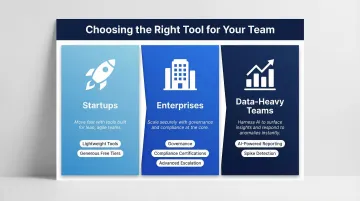
Team size, infrastructure complexity, and incident maturity should drive the decision:
- Startups benefit from lightweight tools with generous free tiers
- Enterprises need governance, compliance certifications, and advanced escalation
- Data-heavy teams require AI-powered reporting with spike detection
The right tool directly affects MTTR, alert fatigue, and how clearly your team can communicate system health to stakeholders — pick based on where those gaps hurt most.
Conclusion
In 2026, the gap between IT alerting and IT reporting is closing. The best platforms deliver real-time incident notifications and automated reporting with AI-generated summaries in one integrated workflow, reducing both downtime and the manual overhead of keeping stakeholders informed.
When selecting a platform, prioritize fit over brand recognition. The right criteria will depend on your specific context:
- Incident volume and alert frequency your team handles
- Data environment complexity (cloud-native, hybrid, or on-prem)
- Scalability requirements as your organization grows
- Stakeholder mix — engineering teams and business leaders often need different views of the same data
Involving both groups early in the evaluation prevents the common problem of buying a tool that serves one audience well and the other poorly.
If your evaluation criteria include governed data context, SOC 2 Type II and HIPAA compliance, and the ability to query data directly from Slack, Sylus is worth a close look. It combines spike activity alerts, scheduled AI-generated report delivery, and analysis grounded in your dbt models — designed for data teams that need speed and auditability at the same time.
Frequently Asked Questions
What is the difference between IT alerting software and IT monitoring software?
Monitoring detects issues by continuously checking system health metrics, while alerting software acts on those signals—routing notifications to the right people through the right channels to trigger a response. They are complementary layers in an incident management stack.
Can one tool handle both IT alerting and automated reporting?
Yes, modern AI-native platforms increasingly support both functions—delivering real-time spike alerts and scheduling automated reports or summaries to email and Slack. Tools like Sylus, Datadog, and PagerDuty each offer varying degrees of combined capability.
What is alert fatigue and how does the right software help reduce it?
Alert fatigue happens when too many low-priority or duplicate alerts cause teams to start ignoring them. Good alerting software cuts through the noise with deduplication, intelligent grouping, and escalation policies that page humans only for genuinely critical events.
What features should I prioritize when choosing IT alerting software for a small team?
Prioritize ease of setup, multi-channel notification delivery, a usable free or low-cost tier, and simple on-call scheduling. Small teams benefit more from reliability and speed than from complex enterprise features like advanced AIOps or 700+ integrations.
How does AI improve IT alerting and reporting in 2026?
AI catches issues that static thresholds miss through anomaly and spike detection, correlates alerts with root cause suggestions, and auto-generates plain-English report summaries. The result: faster time-to-insight and far less manual reporting overhead.
Is IT alerting software suitable for compliance-heavy or regulated industries?
Yes. Many enterprise-grade tools are SOC 2 Type II and HIPAA compliant, support role-based access control, and provide audit logs with delivery receipts. That combination makes them a solid fit for healthcare, financial services, and other regulated sectors.