Introduction
Most AI automation failures in specialized industries aren't model problems — they're connector problems. Niche ERP systems built for field services, specialty manufacturing, or healthcare operations hold rich operational data that standard integration connectors simply weren't designed to reach. Custom objects, proprietary schemas, and non-standard API structures are invisible to generic tooling.
The result: enterprises invest heavily in niche ERPs to manage complex workflows, yet AI automation stays out of reach because the data remains trapped.
Gartner predicts that by 2027, more than 70% of recently implemented ERP initiatives will fail to meet their original business case goals, with data integration and fragmentation cited as primary contributors.
The connector layer is where niche ERP projects succeed or stall. Getting these features right determines whether AI automation delivers on its promise — or never gets off the ground.
Key Takeaways
- Generic connectors fail because niche ERPs use custom objects and non-standard schemas
- Custom connectors mirror your specific ERP's data model, including proprietary fields and workflow states
- Dynamic schema discovery, bidirectional sync, event-driven triggers, field-level transformation, and compliance controls are non-negotiable
- Connected niche ERPs unlock predictive operations, natural language analytics, and automated exception handling
- Modern configurable connector frameworks deliver 380%+ ROI versus building custom integrations
Why Standard Connectors Fall Short for Niche ERP Systems
Most pre-built connectors are designed for mainstream ERP platforms like SAP, Oracle, and NetSuite, assuming standardized data models. Niche ERPs often have custom entities, non-standard field names, and proprietary data relationships that pre-built connectors simply can't map.
Over 55% of mid-market and enterprise ERP deployments involve moderate to heavy customization. In mature ecosystems like SAP, up to 95% of organizations build and run custom code to extend their applications. When AI models attempt to query these systems, they need access to the exact, customized operational reality of the business — not a generic vendor template.
When a standard connector encounters an unmapped custom object or a proprietary workflow trigger, it either errors out, silently drops data, or requires a developer to write custom transformation logic that defeats the purpose of a connector entirely. 95% of IT leaders identify integration issues as a primary barrier to AI adoption, precisely because AI models need comprehensive, real-time data access that unintegrated applications can't provide.
Common Failure Scenarios
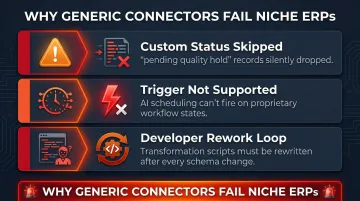
- A specialty manufacturer's custom "pending quality hold" status doesn't exist in the connector's schema, so those records are skipped entirely
- An AI scheduling tool can't trigger on a field service ERP's proprietary "awaiting parts" state because the connector only supports generic CRUD events
- Developers spend weeks writing transformation scripts to map custom fields, then must repeat that work every time the ERP schema changes
These gaps make niche ERP integration a poor fit for off-the-shelf connectors — and exactly where custom connector design becomes necessary.
What Custom Connectors Do Differently
Unlike pre-built connectors that expose a fixed set of endpoints, custom connectors are built or configured to mirror the actual data structure of a specific ERP instance—including custom modules, user-defined fields, and proprietary workflow states.
The core architectural difference is a live schema mapping layer that adapts to the ERP's data model rather than forcing data into a generic template. That adaptability is what makes downstream AI automation reliable.
When your niche ERP stores inventory data in a custom "SpecialtyMaterialsInventory" object with user-defined fields like "ComplianceCertificationStatus," a custom connector recognizes and maps those fields automatically.
Solutions range from fully custom-coded connectors to configurable frameworks:
- Fully custom-coded: Developers write integration code using vendor SDKs like MuleSoft's Mule SDK or Workato's Connector SDK for proprietary protocols and complex logic
- Configurable frameworks: Low-code platforms allow non-developers to define mappings through visual interfaces, adapting to schema changes without writing code
- Hybrid approaches: Pre-built connectors extended with custom field mappings and transformation rules
Hybrid and configurable approaches matter most for niche businesses without dedicated engineering teams. It's a gap the market is actively filling: IDC forecasts a 37.6% CAGR through 2028 for low-code, no-code, and intelligent developer technologies, driven by the need to close integration gaps without large engineering investments.
Must-Have Custom Connector Features for AI Automation in Niche ERP
Dynamic Schema Discovery
The connector should automatically detect and map custom fields, custom objects, and user-defined attributes in the niche ERP—not just standard entities. Static schema connectors break every time an ERP admin adds a new custom field.
Schema evolution—when source systems change their data structures—typically breaks traditional ETL pipelines that rely on static mappings. Platforms like MuleSoft use DataSense to dynamically resolve metadata based on the connector's configuration at design time, automatically discovering custom fields based on the user's credentials.
Example: A specialty healthcare supplier adds a custom "PatientConsentStatus" field to their ERP. With dynamic schema discovery, the connector detects this field automatically and makes it available to downstream AI models within minutes—no developer intervention required.
That kind of automatic field detection becomes even more valuable once you consider what happens when AI needs to write data back, not just read it.
Bidirectional Data Sync with Conflict Resolution
AI automation often writes back to the ERP (for example, updating a record based on an AI decision). Bidirectional sync with conflict resolution logic is essential—without it, AI agents can read data but can't execute actions.
Connectors must support "upsert" operations: the ability to either create a new record or update an existing one based on an external ID. NetSuite's SuiteTalk API uses upsert as a synchronization tool, allowing external systems to push data without needing to verify if a record already exists.
When an AI agent and a human user both modify the same ERP record simultaneously, the connector needs defined conflict-handling logic:
- Timestamp-based resolution (last-write-wins)
- Field-level merging (preserve human edits on specific fields)
- Manual review queues for high-stakes conflicts
Event-Driven Triggers on Custom Workflow States
Many niche ERPs have proprietary workflow states (for example, a specialty manufacturer's "pending quality hold" status). Effective custom connectors support event-driven triggers on these custom states—not just generic CRUD events—so AI automation fires at the right moment in the business process.
Traditional polling architectures introduce lag and unnecessary API load. Modern ERP integrations require Event-Driven Architecture (EDA) using webhooks and Change Data Capture (CDC) to trigger workflows based on specific state transitions.
Consider this scenario: a field service ERP transitions a job to "awaiting parts—urgent." An event-driven connector fires a webhook immediately, triggering an AI agent to check inventory across multiple warehouses, identify the nearest location with the part in stock, and automatically generate a priority transfer order—all within seconds of the status change.
Field-Level Data Transformation and Normalization
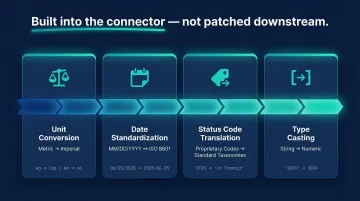
Niche ERPs often store data in formats, units, or taxonomies that differ from what AI models and analytics platforms expect. Transformation rules must be built into the connector layer—not patched downstream—to avoid compounding errors across pipelines.
The most common transformation needs include:
- Converting metric to imperial measurements for cross-system compatibility
- Standardizing date formats (MM/DD/YYYY vs. DD-MM-YYYY vs. ISO 8601)
- Translating proprietary ERP status codes to standardized taxonomies
- Casting string representations of numbers to actual numeric types
Rate Limiting Management and Pagination Handling for Non-Standard APIs
Niche ERP APIs are frequently poorly documented and inconsistent in their pagination and rate-limiting behavior. Enterprise-grade custom connectors must handle these gracefully to prevent data loss or broken syncs during bulk AI data ingestion.
Two common examples illustrate the range of quirks connectors must absorb:
- NetSuite enforces a base concurrency limit of 15 simultaneous requests and caps transfers at 1,000 objects per page
- Epicor requires specific
$skipand$topquery parameters for pagination and returns HTTP 429 errors when throttled
Rather than treating these as edge cases, well-built connectors handle them systematically:
- Cursor-based pagination — more reliable than offset-based approaches for large datasets
- Exponential backoff — automatically retries failed requests with increasing delays
- Jitter — adds randomness to retry timing to prevent cascading system failures
Security and Compliance Controls at the Connector Level
For industries like healthcare or finance, data passing through connectors must meet compliance requirements. Field-level encryption, audit logging, and role-based access controls need to be built in from the start—not bolted on after a security review flags a gap.
The key regulatory standards that govern connector-level security include:
- HIPAA (45 CFR § 164.312) — requires transmission security and encryption to protect electronic protected health information (ePHI)
- NIST SP 800-53 (AU-9) — mandates immutable, Write-Once-Read-Many (WORM) audit logs
- AICPA SOC 2 (CC6) — requires logical access controls to restrict data transmission and movement
In practice, this means connectors should support Enterprise Key Management (BYOK) and granular Role-Based Access Control (RBAC) for connection credentials. Platforms like Tray.io and Workato support streaming immutable logs to external SIEMs for long-term retention and forensic analysis.
Real AI Automation Workflows That Custom Connectors Enable
Predictive Operations Triggering
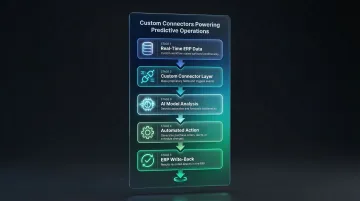
With a custom connector surfacing real-time custom workflow states, AI models can predict bottlenecks and trigger automated actions—purchase orders, alerts, or schedule changes—directly back into the ERP.
Manufacturing Example:
Everyday Technologies, a metal forming company, integrated Plex ERP to create a real-time, continuously updated inventory system. By centralizing real-time production data and automating inventory control, they achieved a 20% reduction in on-hand inventory within the first three months and gained the ability to forecast inventory needs up to 6 months in advance.
Offshore Drilling Safety:
Noble Corporation leverages IFS.ai integrated with their ERP to automate Failure Modes, Effects and Criticality Analysis (FMECA). This anomaly detection shifts maintenance from reactive schedules to predictive models, preventing failures in critical safety infrastructure like Blow Out Preventers. For offshore operations, even a single avoided failure can eliminate millions in lost production costs.
Natural Language Analytics on Niche ERP Data
Once ERP data is reliably connected and normalized, AI analytics platforms can let business users ask questions about their operational data in plain English.
Sylus connects niche ERP data sources so teams can query their operational data conversationally—no data engineer required to write queries against a custom schema. Key capabilities include:
- Supports 500+ integrations across ERP, CRM, and BI platforms
- Grounds all analysis in dbt models for governed, reliable context
- Surfaces anomalies and generates shareable dashboards from plain English prompts
Gartner predicts finance organizations using cloud ERP with embedded AI assistants will see a 30% faster financial close by 2028. That outcome depends on clean, normalized data—natural language query tools hallucinate on messy schemas, which is exactly what custom connectors are built to prevent.
Automated Exception Handling and Escalation
Custom connectors that expose proprietary ERP status fields enable AI agents to detect exceptions and automatically escalate, reassign, or notify—workflows that are invisible to generic connectors.
Finance Workflow Example:
Braincuber's agentic AI implementations in finance workflows reduced manual reconciliation cycles from 4 days per month to under 6 hours. In healthcare vendor management, AI-powered contract monitoring systems integrate with ERPs to automatically detect SLA breaches, reducing the breach detection timeline to under 24 hours.
The same logic applies in field service. A job stuck in a custom "awaiting parts" state beyond SLA triggers an AI agent to escalate to the procurement manager, identify alternative suppliers, and update the customer with a revised ETA—all without human intervention.
Cross-System AI Workflows
Custom connectors enable niche ERP data to feed into broader AI automation stacks—connecting a niche manufacturing ERP to a CRM, a BI platform, and an AI scheduling tool simultaneously—where each system gets properly mapped data rather than a generic dump.
ServiceTitan Example:
ServiceTitan's Dispatch Pro utilizes AI and machine learning to optimize technician routing and scheduling. By integrating this predictive scheduling across their operational stack, Besser Garage Door achieved a 30% increase in average ticket size, a 9% increase in their sold lead ratio, and a 10% decrease in drive time per visit.
How to Evaluate a Custom Connector for Your Niche ERP
Key Questions to Ask Vendors
Technical capabilities to verify:
- Does the connector support your specific ERP version and all custom modules?
- Can it handle schema changes without manual reconfiguration?
- What is the latency for event-driven triggers?
- Is bidirectional sync supported, including upsert operations?
- How does the connector handle API rate limiting and pagination for your specific ERP?
Security and compliance questions:
- Does the connector support field-level encryption?
- Are immutable audit logs available?
- What compliance certifications does the connector hold (SOC 2, HIPAA)?
- Can you deploy the connector in your own environment (self-hosted)?
Maintenance and support expectations:
- What happens when your ERP vendor updates their API?
- How quickly are connector updates released?
- Is there dedicated support for troubleshooting integration issues?
Build vs. Buy Decision Framework
When a Configurable Connector Framework Is Sufficient:
- Your niche ERP exposes a well-documented API
- Schema changes are infrequent (quarterly or less)
- Data volume is moderate (under 1 million records per sync)
- You lack dedicated integration engineering resources
When a Fully Bespoke Integration Is Warranted:
- Your ERP uses proprietary protocols without standard REST/SOAP APIs
- Real-time latency requirements are under 100ms
- Compliance requirements demand on-premises deployment with no external dependencies
- Data transformation logic is highly complex or uniquely business-critical
Total Cost of Ownership
By 2026, 90% of organizations will face critical talent shortages, potentially costing $5.5 trillion in losses. Maintaining bespoke integration code compounds that pressure — custom integrations demand dedicated development teams, break when APIs change, and accumulate maintenance debt that crowds out product work.
That makes the ROI case for managed connectors hard to ignore:
ROI Data:
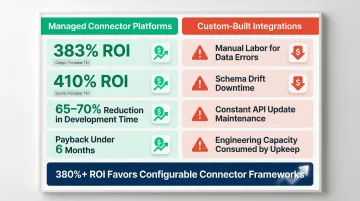
- Forrester TEI study on Celigo's iPaaS: 383% ROI and $1.1 million NPV over three years, with up to 70% reduction in development timelines
- Forrester TEI study on Boomi Enterprise Platform: 410% ROI, 65% reduction in integration development times, with payback period under six months
Hidden Costs of Custom Builds:
- Manual labor resolving data errors
- Operational downtime caused by schema drift
- Constant code updates when SaaS vendors alter their APIs
- Lost opportunity cost when engineering teams maintain integrations instead of building features
Frequently Asked Questions
Which AI features help automate ERP workflows?
Key AI automation features include event-driven triggers that respond to specific ERP status changes, predictive decision-making for inventory and scheduling, natural language querying of ERP data, and automated exception handling. All of these depend on clean, structured data flowing through a properly configured connector.
What do AI-driven features in the ERP system help accomplish?
AI-driven ERP features reduce manual data entry, surface operational bottlenecks proactively, automate routine decisions like reordering and scheduling, and enable business users to get answers from their operational data without relying on IT.
What is a custom connector in ERP integration?
A custom connector is an integration layer built to mirror a specific ERP's data model, including custom fields and proprietary objects. This enables reliable data flow to external tools and AI platforms without data loss or transformation errors.
How do custom connectors differ from pre-built connectors for niche ERP?
Pre-built connectors support fixed, standardized endpoints suited to mainstream ERP platforms, while custom connectors are designed to map to any schema—including the non-standard structures common in niche and industry-specific ERP systems. Custom connectors are shaped around your ERP's actual structure, not a generic approximation of it.
Can custom connectors work with any niche ERP system?
Configurable connector frameworks can work with any ERP that exposes an API, though the depth of support depends on the ERP's API documentation quality. Fully custom-coded connectors may be needed for legacy or poorly documented niche systems that use proprietary protocols.
What data security considerations matter for custom ERP connectors?
Field-level encryption, audit logging, role-based access controls, and compliance certifications (SOC 2, HIPAA) are critical requirements, especially for niche ERPs in regulated industries like healthcare, financial services, or defense manufacturing. The connector layer must enforce these controls natively rather than bolting them on later.