Introduction
Data is everywhere, but accessing the right information at the right time remains a bottleneck for most teams. Engineers spend hours writing complex SQL queries, while business leaders wait days for reports that should take minutes. According to Monte Carlo research, data professionals spend 40% of their time evaluating data quality, and the average organization experiences 793 hours of monthly "data downtime."
A data query is a structured request sent to a database to retrieve, filter, sort, or manipulate specific information. This article covers:
- What data querying is and how it works
- The four main query types and when to use each
- Languages used (SQL and beyond)
- Common performance challenges
- How AI is changing who can access data
TLDR:
- Data queries retrieve specific information from databases without manual scanning
- Four query types serve different purposes: select (read), action (write/modify), parameter (dynamic), and aggregate (calculations)
- SQL leads at 53.2% developer usage, with AI tools now generating queries from plain English
- Poor query performance costs organizations $12.9M annually on average
- AI query tools work best when grounded in governed data models — preventing inaccurate or fabricated results
What Is a Data Query?
A data query is a structured request sent to a database to retrieve, filter, sort, or manipulate specific information—like asking a question and getting a precise, formatted answer back. The global datasphere reached 149 zettabytes in 2024 and is projected to hit 181 zettabytes by 2025, making manual data scanning obsolete.
How Data Lives in Databases
Data lives in databases as rows and columns organized into tables. Without queries, accessing specific information would mean manually scanning massive datasets. Imagine finding all customers in California from a table of 50,000 records—a query can retrieve this in milliseconds, while manual scanning would take hours.
The Query Language and Execution
That millisecond retrieval depends on a structured language the database engine can parse. Queries are written primarily in SQL; the engine processes the request, fetches matching records, and returns results as a table, chart, or exportable file. At enterprise data volumes, this is the only practical way to interact with stored information.
Simple vs. Complex Queries
Queries range from simple to highly complex:
- Retrieve a single field: "Show me all customer names"
- Join multiple tables, apply subqueries, and aggregate results: "Show me total revenue by product category for customers acquired in Q4 who made repeat purchases"
Snowflake telemetry analyzing 667 million production queries reveals that 20% of enterprise queries include 10 or more joins, and 0.52% exceed 100 joins.
Business Significance
Every dashboard metric, sales report, and trend analysis starts with a query. The faster and more reliably your team can write and run them, the faster your organization can act on what the data actually shows.
The Four Types of Data Queries
Choosing the right query type comes down to intent: are you retrieving data, modifying it, or summarizing it? Each type has a distinct role — and distinct risks.
Select Queries
Select queries are the most common type—used purely to retrieve data from a database without modifying it. Analysis of 667 million Snowflake queries shows that 47% are SELECT statements, with an additional 31% being metadata queries (SHOW, DESCRIBE). This 25:1 read-to-write ratio demonstrates that enterprise workloads are overwhelmingly focused on data retrieval.
Plain-English example: "Show me all orders placed in the last 30 days with a value over $500."
Action Queries
Action queries modify the database, so precision matters. A poorly written delete query can wipe the wrong records. Action queries represent just 2% of enterprise query volume but carry the highest risk.
Three types:
- INSERT adds new records to a table
- UPDATE modifies existing records in place
- DELETE removes records permanently — with no undo
Parameter Queries
Parameter queries are dynamic—they prompt the user for input each time they run (e.g., "Enter the start date" and "Enter the end date"). This makes them reusable and flexible without rewriting the query each time.
OWASP identifies parameterized queries as the primary defense against SQL injection attacks (CWE-89), forcing the database to distinguish between executable code and user data.
Plain-English example: "Show me all transactions between [start date] and [end date] for [selected region]."
Aggregate / Summary Queries
Aggregate queries perform calculations on grouped data—COUNT, SUM, AVG, MIN, MAX. These are the backbone of dashboard metrics and KPI reporting.
Example: "What is the average order value per product category this quarter?"
How Data Querying Works: From Request to Result
Understanding the query lifecycle helps explain why some queries run in milliseconds while others take minutes.
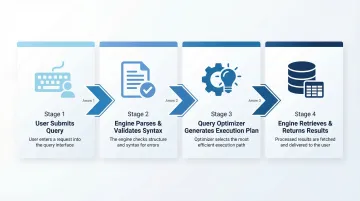
The Four-Stage Pipeline
- User submits a query - Written in SQL or generated by a tool
- Database engine parses and validates syntax - Checks for errors
- Query optimizer generates an execution plan - Evaluates multiple strategies
- Engine retrieves data and returns results - Executes the optimal plan
Query Optimization
Step 3 is where most of the heavy lifting happens. The engine evaluates multiple execution plans and chooses the most efficient one based on CPU usage, index availability, and table size. Microsoft SQL Server's cost-based optimizer analyzes access methods to return results fastest using the fewest resources.
When Indexes Help—and When They Don't
Indexing speeds up query results—think of it like a book index versus reading every page. PostgreSQL benchmarks on 10 million rows show composite indexes executing in 0.06 milliseconds, roughly 100 times faster than merging two separate indexes (20.3 milliseconds).
However, indexing isn't always faster. Percona benchmarks reveal that when data doesn't fit in memory (disk-bound), a full table scan (4 seconds) can outperform a full index scan (30 seconds) due to sequential disk reads being faster than random reads required for index lookups.
Parameterization and Security
Using placeholders instead of hardcoded values is a simple change with significant payoff. Parameterized queries:
- Make queries reusable across different inputs without rewriting
- Reduce redundancy by separating logic from data values
- Block SQL injection attacks by preventing user input from being interpreted as executable code
For enterprise data teams handling sensitive records, that last point isn't optional.
Data Query Languages: SQL and Beyond
SQL (Structured Query Language) is the dominant standard for querying relational databases. Developed by IBM in 1974 as SEQUEL for the System R project, its declarative syntax and ANSI standardization made it the common language across databases like MySQL, PostgreSQL, SQL Server, and Oracle.
SQL's Enduring Dominance
The 2025 Stack Overflow Developer Survey reports that 53.2% of developers have done extensive development work with SQL over the past year. That consistency, across five decades and multiple waves of new technology, reflects how deeply SQL is embedded in how data teams operate.
NoSQL Alternatives
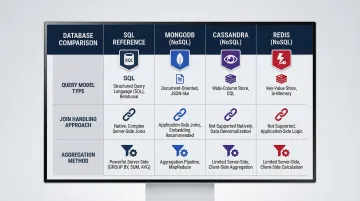
Not all databases use SQL. NoSQL databases use their own query methods suited to unstructured or semi-structured data:
| Database | Query Model | Join Handling | Aggregation Approach |
|---|---|---|---|
| MongoDB | Document Model / MQL | $lookup stage (embedded documents preferred) | Aggregation Pipeline |
| Apache Cassandra | Wide-Column / CQL | No joins supported (requires denormalization) | Partition-key driven |
| Redis | Key-Value / Command-based | No native joins | FT.AGGREGATE for indexing |
The SQL Knowledge Gap
SQL is powerful but has a steep learning curve. Most business users depend on data or engineering teams to write queries for them—creating a bottleneck that slows reporting cycles and delays answers to time-sensitive questions. Forrester research predicts that by 2025, nearly 70% of employees will be expected to use data heavily in their jobs, up from 40% in 2018. That gap between who needs data and who can actually query it is exactly what natural language query tools are designed to close.
Common Data Query Challenges
Performance Issues
Slow queries caused by missing indexes, inefficient joins, or scanning unnecessarily large datasets impact database health and downstream reporting speed. Gartner estimates that poor data quality costs organizations an average of $12.9 million annually in wasted resources and lost opportunities.
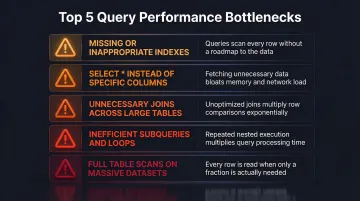
Common performance bottlenecks:
- Missing or inappropriate indexes
- SELECT * instead of specific columns
- Unnecessary joins across large tables
- Inefficient subqueries and loops
- Full table scans on massive datasets
Data Accuracy Risks
Queries that return incorrect results due to flawed logic, missing filters, or dirty underlying data create compounding downstream problems — bad numbers in one report cascade into flawed decisions across the business. Teams typically catch these errors through benchmark comparisons or peer review, but that process adds hours to every analysis cycle.
When data accuracy breaks down, the cost isn't just wasted analyst time — it's eroded trust in reporting that takes months to rebuild.
Access and Governance Challenges
In large organizations, not everyone should query all data — but enforcing that in practice is harder than it sounds. Managing permissions, ensuring compliant data access, and maintaining a single source of truth are persistent pain points for data teams.
The stakes are real. The 2025 Verizon Data Breach Investigations Report found that 20% of breaches involved exploitation of vulnerabilities and 30% involved third parties — risks that uncontrolled query access directly amplifies.
Key governance pressure points include:
- Role-based access controls that don't keep pace with team growth
- Shadow queries bypassing approved data pipelines
- Inconsistent definitions across teams creating conflicting metrics
The Rise of AI-Powered Data Querying
From SQL to Plain English
Instead of writing SQL syntax, AI-powered query tools let users ask questions in plain English ("What were our top 10 revenue-generating products last quarter?") and automatically generate and run the underlying query. This makes data accessible to everyone, not just engineers.
According to the 2025 Stack Overflow Developer Survey, 84% of developers are using or planning to use AI tools in their development process. However, positive sentiment for AI tools decreased from over 70% in 2023/2024 to just 60% in 2025, driven by declining confidence in AI accuracy.
The Governance Challenge
AI tools need grounded context to produce accurate results. The NIST AI Risk Management Framework warns that LLMs are prone to "confabulation" (hallucinations), where they confidently present erroneous content because generative models approximate statistical distribution rather than retrieving factual truth.
Tools built on a governed layer—like dbt models and documentation—are less likely to hallucinate or return misleading answers. Sylus is built on this governed context model, grounding all analysis in a team's dbt models so results are trustworthy and consistent.
The Business Impact
When non-technical users can self-serve data queries, analyst and engineering teams are freed from repetitive ad-hoc requests. Monte Carlo research found that the average organization experiences 61 data-related incidents per month, each taking 13 hours to identify and resolve—resulting in 793 hours of monthly "data downtime."
Those 793 hours represent analyst time spent firefighting rather than answering the strategic questions leadership actually needs. Reducing that burden starts with giving non-technical users reliable, self-serve access to data.
Frequently Asked Questions
What is a data query?
A data query is a structured request to a database for specific information. It retrieves, filters, sorts, or modifies data — and sits at the foundation of all analytics and reporting. Without queries, accessing data would mean manually scanning massive datasets.
What are the four types of queries?
The four main query types are:
- Select queries — retrieve data without modifying anything
- Action/DML queries — INSERT, UPDATE, or DELETE records
- Parameter queries — accept dynamic, user-prompted inputs
- Aggregate/summary queries — run calculations like COUNT, SUM, and AVG for metrics and KPIs
What is SQL and why is it the most common query language?
SQL (Structured Query Language) is the standardized language for querying relational databases, developed by IBM in 1974. It runs across major platforms like MySQL, PostgreSQL, and SQL Server. According to Stack Overflow's Developer Survey, 53.2% of developers use it regularly — largely because it balances power with human-readable syntax.
What is the difference between a select query and an action query?
Select queries only read data without changing anything in the database. Action queries (INSERT, UPDATE, DELETE) actively modify the database by adding, changing, or removing records—making them higher-risk and requiring more careful construction and testing.
Can non-technical users run data queries without knowing SQL?
Yes. Modern AI-powered analytics tools let users ask questions in plain English and generate the underlying query automatically. Sylus grounds these queries in governed dbt models, so business users get accurate results without writing a line of SQL.
How do you optimize a slow data query?
Common optimization tactics include:
- Use indexed columns to speed up lookups
- Select only needed fields — avoid SELECT *
- Simplify or eliminate unnecessary joins
- Review the execution plan to spot bottlenecks like full table scans