This guide breaks down what data connectors are, how they work in practice (including extraction and load modes), what types exist, and where they're used across modern data stacks. Whether you're evaluating pre-built connector platforms or planning custom integrations, understanding these fundamentals will help you build reliable, scalable data pipelines.
Key Takeaways
- Data connectors extract data from source systems and deliver it to destinations automatically and on schedule
- Abstract connection complexity across databases, APIs, files, and event streams through standardized interfaces
- Primary extraction modes: snapshot (full pull) and incremental (only changed data); load modes include replace, append, and merge
- Common types: database, API, flat file, cloud storage, and event stream connectors
- Essential infrastructure for analytics, BI, data warehousing, and AI platforms that depend on fresh, continuous data
What Are Data Connectors?
Data connectors are software programs or components that establish a link between a source system and a destination system, enabling automated, repeatable extraction and delivery of data—without requiring manual export/import each time. They work like plumbing: moving data from where it's created (your CRM, database, or SaaS tool) to where it's analyzed (your data warehouse, BI platform, or analytics tool).
Why Data Connectors Exist
As businesses adopted more SaaS tools, cloud platforms, and internal databases, data became fragmented across dozens of incompatible systems. A sales team might use Salesforce, marketing relies on HubSpot, finance operates in NetSuite, and engineering stores data in PostgreSQL. Without a dedicated connection layer, unified analysis becomes impossible—teams resort to manual CSV exports, brittle scripts, or no integration at all. Data connectors solve this operational gap by providing a standardized, automated bridge between these systems.
What Data Connectors Are Not
Connectors are often conflated with related tools. Here's where the lines are:
- ETL platforms do transformation logic; connectors handle extraction and loading only (though they're often components within ETL/ELT platforms)
- APIs expose data endpoints; connectors are the software that calls those APIs to extract and deliver data
- Data pipelines orchestrate entire workflows; connectors are the ingestion mechanism within those pipelines
Why Connectors Still Matter
Despite the rise of data warehouses like Snowflake, data lakes, and AI analytics platforms, connectors remain necessary because data still originates in source systems that don't natively integrate with analytics destinations. A connector bridges that gap, handling authentication, extraction logic, error handling, and delivery—so your analytics layer consistently receives fresh, reliable data to work with.
How Do Data Connectors Work?
Data connectors operate through a defined sequence of stages—connection, extraction, and loading—each of which determines how reliably and efficiently data arrives at its destination.
Connection & Authentication
A connector initiates contact with a source system by authenticating via API keys, OAuth tokens, database credentials, or certificates. It then establishes a live or scheduled connection to the source. This stage is where most configuration happens and where failures are most common—expired API tokens, changed credentials, or restricted network access can break pipelines instantly.
Teams that monitor connection health proactively catch these failures before they cascade downstream.
Data Extraction
Connectors use two primary extraction modes:
Snapshot (Full) Extraction The entire dataset is pulled with every run. Simple to implement but resource-intensive, snapshot extraction is common with legacy systems and flat files that don't track changes. For example, exporting a complete customer table every night regardless of what's changed.
Incremental Extraction
Only new or changed records are pulled since the last run. Far more efficient, incremental extraction requires the source to track changes via timestamps, sequence IDs, or Change Data Capture (CDC). For instance, a connector might query for all orders where updated_at > last_sync_timestamp.
Common Extraction Challenges:
- Schema changes in source systems (new columns, renamed fields)
- Handling deletions (records removed from source)
- Historical syncs (backfilling years of data)
- Error handling (partial failures, network timeouts)
Connectors that handle these scenarios well include retry logic, schema drift detection, and fallback behavior that preserves partial data on failure rather than discarding a full run.
Data Loading
Once data is extracted, it must be loaded into the destination. Connectors use three primary load modes:
Replace (Overwrite) Each run completely overwrites destination data. Paired with snapshot extraction, this mode is simple but risky—any extraction failure means losing all historical data in the destination.
Append New data is added to existing destination data without modifying previous records. Paired with incremental extraction, append mode works well for event logs and immutable records, but can create duplicates if not carefully managed.
Merge (Upsert) New records are inserted, changed records are updated, and duplicates are prevented. This is the most sophisticated and data-safe mode, requiring the connector to match records by primary key and apply updates intelligently.
Choosing the right load mode in isolation isn't enough—it has to align with your extraction mode. Mismatching the two is one of the most common pipeline mistakes teams make.
Critical: Matching Extraction and Load Modes
For example:
- Incremental extract + Replace load = Data loss (only the latest changes remain, historical data is wiped)
- Snapshot extract + Append load = Massive duplication (entire dataset is appended every run)
- Incremental extract + Merge load = Correct pattern (only changed records are updated)
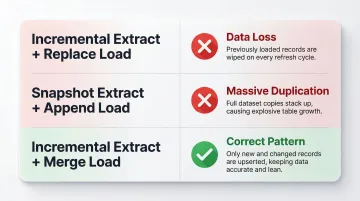
Always verify your extraction and load modes are compatible before deploying a pipeline to production.
Types of Data Connectors
Connectors are typically categorized by the type of source system they connect to. Choosing the right connector type depends on where your data lives and how it's exposed.
Database & Data Warehouse Connectors
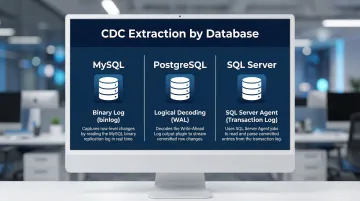
These connect to relational databases (MySQL, PostgreSQL, SQL Server), NoSQL databases (MongoDB), and analytical warehouses (Snowflake, BigQuery, Redshift). Database connectors are the most common type in enterprise analytics, using SQL queries for extraction. Most are internal to the organization and leverage Change Data Capture (CDC) to track row-level changes via transaction logs:
- MySQL: Reads the binary log (binlog)
- PostgreSQL: Uses logical decoding on the write-ahead log (WAL)
- SQL Server: Uses the SQL Server Agent to read transaction logs
API Connectors
API connectors target REST or GraphQL endpoints exposed by SaaS applications—Salesforce, HubSpot, Stripe, Jira, Google Analytics. They enable data extraction from external platforms over the internet. API rate limits and authentication token expiry are the most common operational friction points. Connectors must handle:
- OAuth token refresh
- Pagination (offset/limit or cursor-based)
- Exponential backoff for rate limit errors
- Webhook integration for real-time updates
File-Based & Cloud Storage Connectors
Flat file connectors handle CSV, JSON, and XML files exported from legacy systems on a schedule. These are often the only option for systems without modern APIs.
Cloud object storage connectors integrate with AWS S3, Google Cloud Storage, and Azure Blob Storage. They're ideal for globally distributed, serverless file distribution. Connectors use directory listing or event notifications (like S3 event triggers or Google Cloud Pub/Sub) to detect new files and ingest them automatically.
Event Stream & IoT Connectors
Event queue connectors integrate with AWS SQS and RabbitMQ, where data is published to temporary queues in FIFO/LIFO order. Common in microservice architectures for asynchronous messaging.
Event stream connectors work with Apache Kafka and AWS Kinesis, acting as real-time observers that ingest data as it flows. These are suited to high-velocity, time-sensitive data like clickstreams, sensor telemetry, and financial transactions.
IoT connectors handle distributed device fleets generating sensor or telemetry data. Unlike standard API connectors, they rely on lightweight protocols like MQTT or CoAP designed for constrained, low-bandwidth devices.
Where Data Connectors Are Used
Data connectors sit at the ingestion layer of any modern data stack, feeding data from source systems into data warehouses, data lakes, and BI platforms. They're what makes scheduled, automated analytics possible without engineering intervention on every data refresh.
Industry Applications
Retail and E-commerce Retail teams use connectors to sync point-of-sale systems, Shopify stores, and advertising platforms into a unified analytics layer — pulling together sales data, CRM records, and inventory levels for performance analysis.
Financial Services Financial data moves fast and carries high stakes. Connectors handle high-frequency trading data, fraud detection feeds, and regulatory reporting — all with strict latency and accuracy requirements.
Healthcare Connecting EHR systems, billing platforms, and operational databases. Compliance requirements like HIPAA add additional connector configuration requirements—data must be encrypted in transit and at rest, access must be logged, and Business Associate Agreements must be in place with connector vendors.
The Role in AI-Powered Analytics
Modern platforms like Sylus depend entirely on reliable data connectors as the foundational data delivery layer. Sylus lets data teams and business users query connected sources in plain English, generate dashboards automatically, and ask questions like "show me my top customers" directly in Slack.
Without connectors continuously feeding fresh, structured data into the platform, AI-driven analysis has nothing to work with.
Pre-Built vs. Custom Connectors
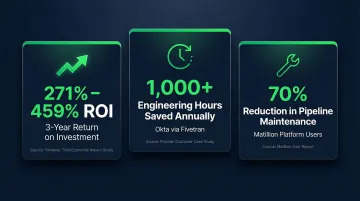
Pre-built connectors offered by platforms with libraries of hundreds of sources (like Fivetran or Airbyte) reduce engineering effort and accelerate time to first insight. Independent studies show these platforms deliver between 271% and 459% ROI over three years, with payback periods of 3-4 months. Real-world results back this up:
- Fivetran saved Okta 1,000 engineering hours annually (~$100k in labor)
- Matillion users report a 70% reduction in pipeline maintenance time
- Payback periods typically land at 3-4 months
Custom connectors are reserved for proprietary or specialized internal systems where no pre-built option exists. Building them is expensive and time-consuming—for most teams, pre-built connectors are the right starting point.
Frequently Asked Questions
What is a data connector?
A data connector is a software component that establishes an automated link between a source system (database, API, file, cloud storage) and a destination system, enabling scheduled or continuous data extraction and delivery without manual intervention.
What is a data source connector?
A data source connector is the source-side component of a data pipeline. It handles authentication, connection, and extraction from a specific source system, as distinct from the destination-side loader that writes data to the target.
What are the different types of data connectors?
The main categories include database/data warehouse connectors, API connectors, flat file connectors, cloud storage connectors, event stream/queue connectors, and IoT connectors—each suited to a different source system type.
What are examples of data connectors?
Common examples include:
- A Salesforce API connector pulling CRM data into a data warehouse
- A PostgreSQL connector syncing transactional records to Snowflake
- An S3 connector ingesting files into a data lake for analytics
What is real-time data integration?
Real-time data integration is the continuous movement of data from source to destination as it's generated — using event streams, Change Data Capture (CDC), or streaming connectors to minimize latency, unlike batch processing which moves data on a fixed schedule.
What ETL tools support real-time data integration?
Fivetran, Airbyte, and Kafka-based pipelines all support real-time or near-real-time integration — though the right choice depends on whether your source system supports streaming APIs or Change Data Capture, not the tool alone.