Introduction
Most finance teams aren't short on data — they're short on time to use it. 69% of finance leaders spend at least five hours every week recreating reports, while 58% burn another five hours just transferring data between systems. That's a full workday lost every week to tasks that shouldn't require a human.
The financial cost compounds that problem. Poor data quality runs organizations an average of $12.9 million annually, and 50% of spreadsheet models contain material defects — a key driver behind a nine-year high in financial restatements.
Automated financial reporting tools address this directly by connecting live data sources, eliminating manual transfers, and delivering scheduled insights without human intervention.
This guide covers the best automated financial reporting tools for 2026 — what each one does well, where it falls short, and which criteria matter most when evaluating options for your team's size, stack, and reporting cadence.
Key Takeaways
- Automated financial reporting tools eliminate manual spreadsheet work by connecting to data sources and auto-generating reports, dashboards, and scheduled summaries
- Top tools in 2026 offer real-time data integration, AI-generated summaries, anomaly alerts, and scheduled delivery to email or Slack
- Key selection factors: data source integrations, AI capabilities, security/compliance certifications, ease of use, and scalability
- Top tools covered: Sylus, Microsoft Power BI, Tableau, LiveFlow, and Vena—each serving different use cases and team sizes
- For AI-native querying grounded in dbt models, Sylus is built specifically for that workflow
What Is Automated Financial Reporting?
Automated financial reporting uses software to extract data from financial systems—ERPs, accounting platforms, CRMs, databases—apply pre-defined calculations or queries, and deliver structured reports or dashboards without manual data entry or formatting.
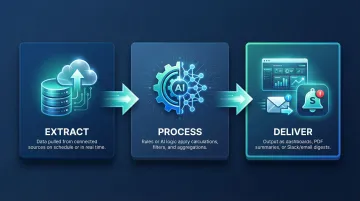
The core workflow runs in three stages:
- Extract: Data is pulled from connected sources on a scheduled or real-time basis
- Process: Rules or AI-driven logic apply calculations, filters, and aggregations
- Deliver: Output arrives as visual dashboards, PDF summaries, or Slack/email digests
Modern tools have moved well beyond static spreadsheets. The latest platforms add AI layers that surface anomalies, generate narrative summaries, and answer ad hoc questions in plain English — shifting finance teams from reactive report-pulling to proactive analysis.
59% of finance leaders now report using AI in their finance function, with anomaly detection cited by 65% as a top value-driver.
Best Automated Financial Reporting Tools for 2026
Tools were evaluated based on financial use-case depth, AI capability, integration breadth, security posture, ease of use, and scalability for both lean data teams and enterprise finance functions.
Sylus
Sylus is an AI-powered analytics platform designed for data teams and business users at fast-growing startups and enterprises. It connects directly to your data sources and lets users ask financial questions in plain English—functioning like an AI data analyst that explores the data, validates assumptions, and returns a final deliverable (dashboard, chart, or summary).
The core differentiator for financial reporting: Sylus grounds all analysis in governed context (dbt models and documentation), so every output aligns with how your business defines its metrics. This eliminates conflicting numbers across teams without requiring engineering involvement on each new report.
It can generate entire financial dashboards, schedule AI-generated report summaries to email or Slack, and send alerts on spending spikes or anomalies. Sylus is SOC 2 Type II and HIPAA compliant, offers self-hosted deployment for strict data residency requirements, and prices on a usage-based model with unlimited seats.
| Feature | Details |
|---|---|
| Key Features | AI natural language querying, governed dbt context, automated dashboard generation, scheduled reports to email/Slack, anomaly alerts, self-hosted option |
| Best For | Data teams and finance users at startups and enterprises who want AI-native financial analysis without engineering overhead |
| Pricing | Usage-based with unlimited seats; research current pricing on the Sylus website |
Microsoft Power BI
Power BI is Microsoft's enterprise-grade business intelligence platform, widely adopted by finance teams for its deep integration with Excel, Azure, Dynamics 365, and the broader Microsoft 365 ecosystem. For organizations already running on Microsoft infrastructure, it requires minimal onboarding overhead.
Power BI supports automated data refresh, scheduled report delivery, real-time dashboards, and advanced DAX-based financial modeling. It handles large datasets well and includes row-level security for financial data governance. AI features (Copilot, Q&A natural language) are still maturing but functional.
Recognized as a Leader in the 2025 Gartner Magic Quadrant for Analytics and Business Intelligence Platforms for the 18th consecutive year. That said, licensing grows complex at scale, with Premium tiers required to unlock full AI capabilities.
| Feature | Details |
|---|---|
| Key Features | Automated data refresh, DAX financial modeling, real-time dashboards, Copilot AI integration, deep Microsoft ecosystem connectivity |
| Best For | Enterprise finance teams already within the Microsoft ecosystem needing scalable BI and reporting |
| Pricing | Research current Power BI Pro and Premium pricing on Microsoft's website |
Tableau
Tableau (a Salesforce company) is a data visualization and analytics platform used widely across enterprise finance and operations teams for its visual storytelling depth, broad connector library, and interactive dashboards that can be embedded or shared across the organization.
Strengths for financial reporting: real-time data sync, support for complex multi-source financial data, scheduled extracts and subscriptions, and an extensive community of templates and extensions. Recognized as a Leader in both the 2024 Gartner Magic Quadrant and Q2 2025 Forrester Wave. However, it requires a steeper learning curve and carries higher licensing costs for large teams, making it better suited to organizations with dedicated analytics resources.
| Feature | Details |
|---|---|
| Key Features | Real-time data sync, interactive financial dashboards, scheduled report subscriptions, Salesforce CRM integration, broad connector library |
| Best For | Mid-to-large enterprises with dedicated data/analytics teams needing advanced visualization and financial storytelling |
| Pricing | Research current Tableau Creator/Explorer/Viewer pricing on Salesforce's website |
LiveFlow
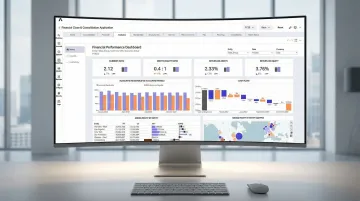
LiveFlow is a finance-specific automated reporting platform built for modern accounting and FP&A teams. It connects directly with QuickBooks and other accounting systems to deliver real-time, automatically updated financial statements, dashboards, and consolidation reports, with strong multi-entity support.
LiveFlow offers true real-time dashboards (not batch-refreshed), automated cash flow forecasting, budget vs. actuals tracking, and multi-entity consolidation in under three minutes, all through an intuitive interface that doesn't require a technical background.
It also supports multi-currency consolidation across 160+ currencies. This makes it especially compelling for SMBs and growing businesses managing multiple entities through QuickBooks.
| Feature | Details |
|---|---|
| Key Features | Real-time QuickBooks sync, multi-entity consolidation, cash flow forecasting, budget vs. actuals, automated financial statements |
| Best For | Accounting and FP&A teams at SMBs and mid-market companies managing QuickBooks-based reporting and consolidation |
| Pricing | Research current LiveFlow pricing on their website |
Vena
Vena is a corporate performance management (CPM) and FP&A platform built around a familiar Excel-based interface, designed for finance teams that need robust planning, budgeting, and forecasting capabilities alongside automated financial reporting.
Vena preserves Excel workflows while adding a centralized data model, workflow automation, and audit controls, which reduces version-control issues without forcing teams to abandon familiar processes. Recognized as a Challenger in the 2025 Gartner Magic Quadrant for Financial Planning Software, it is strong for annual budgeting cycles, multi-department planning, and variance analysis. However, it lacks the real-time dashboard responsiveness of newer platforms like LiveFlow or Sylus.
| Feature | Details |
|---|---|
| Key Features | Excel-native interface, centralized data model, budgeting and forecasting automation, workflow controls, multi-department planning |
| Best For | Enterprise finance teams seeking a CPM platform that preserves Excel workflows while adding planning and reporting automation |
| Pricing | Research current Vena pricing on their website |
How We Chose the Best Automated Financial Reporting Tools
Tools were assessed against the failure points finance teams hit most often with manual reporting: data inconsistency across sources, slow turnaround, no real-time visibility, and reporting that breaks down as the business grows.
One common misstep is selecting a generic BI tool when the team actually needs a finance-specific platform—or the reverse. The result is either an over-engineered setup no one uses or a tool that can't handle consolidation, budgeting, or multi-entity reporting. The criteria below are designed to help avoid that mismatch.
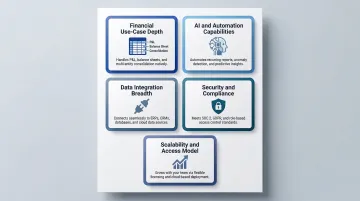
Key Selection Criteria
Financial use-case depth: Finance-specific platforms like LiveFlow offer pre-built P&L, cash flow, and consolidation templates out of the box. General BI tools can handle these workflows, but expect significant configuration before they're usable by a finance team.
AI and automation capabilities: Can it generate reports, surface anomalies, or answer questions without manual query writing? 87% of CFOs view AI as extremely or very important for 2026, but actual adoption remains concentrated on basic operational wins. Look for tools with embedded, finance-specific AI agents.
Data integration breadth: Does it connect to your accounting system, ERP, CRM, or data warehouse? Native, real-time API integrations to core systems eliminate manual CSV exports and ensure dashboards reflect current data.
Security and compliance: Does it hold SOC 2 Type II, HIPAA, or relevant certifications for handling financial data? 83% of enterprise buyers now require SOC 2 certification before signing SaaS contracts, treating it as a hard prerequisite.
Scalability and access model: Per-seat pricing can create a cliff as teams grow. 61% of SaaS companies have moved to usage-based pricing, which complicates total cost comparisons. Model your 3-year TCO before committing to any contract structure.
Use these criteria as a filter, not a checklist. The best fit depends on where your team is losing the most time today—and where you need reporting to be in 12 months.
Conclusion
The best automated financial reporting tool isn't simply the most feature-rich—it's the one that integrates cleanly with your existing data infrastructure, matches your team's technical capability, and actually gets adopted across finance and business stakeholders.
Start by auditing your current reporting workflow. Identify where hours are being lost — whether the core problem is data consolidation, visualization, AI-driven analysis, or report distribution — then match the tool to that specific gap.
If your gap is moving beyond static dashboards to actually querying your data in plain English, Sylus is built for that. It connects your data sources, grounds analysis in governed dbt context, and delivers scheduled financial summaries to email or Slack. Explore Sylus to see how AI-powered financial reporting works in practice.
Frequently Asked Questions
What are automated reporting tools?
Automated reporting tools are software platforms that connect to data sources, process metrics, and deliver formatted reports or dashboards on a schedule—eliminating manual data collection and reducing the risk of human error in financial reporting.
What is the best software to create reports?
The best reporting software depends on the use case: AI-native platforms like Sylus are strong for teams wanting natural language querying and governed analysis, while Power BI and Tableau suit enterprises needing deep BI modeling, and finance-specific tools like LiveFlow excel for accounting teams managing real-time financial statements.
What is the best AI tool for reports?
AI reporting tools like Sylus let users ask questions in plain English, auto-generate dashboards, and receive AI-written summaries. All analysis is grounded in governed data definitions (such as dbt models), ensuring consistency across the organization.
Do automated financial reporting tools require coding skills to set up?
Most modern tools offer no-code or low-code interfaces. Some—like Power BI or Tableau—benefit from familiarity with data modeling or query languages for advanced use cases. AI-first platforms like Sylus are designed so business users can get insights without writing any code.
Can automated financial reporting tools integrate with existing accounting software?
Most tools support integrations with common accounting platforms (QuickBooks, NetSuite, Xero) as well as data warehouses, ERPs, and CRMs. Integration depth varies by tool, so buyers should verify native connector availability for their specific stack before committing.