Introduction
Most companies have more data than they know what to do with. Global data generation is forecast to triple between 2025 and 2029, yet most teams are still waiting days—sometimes weeks—for reports that should take minutes. The real problem isn't access to data. It's speed to insight.
AI tools for business analytics are closing this gap by automating data processing and delivering insights in plain English—no SQL expertise or weeks of dashboard development required. These platforms apply machine learning, natural language processing, and predictive modeling to help teams act on data faster than traditional BI tools ever could.
This article delivers a curated list of 15 AI analytics tools, the criteria used to evaluate them, and guidance on how to choose the right fit for your team's needs—whether your team runs on raw SQL or plain English questions.
Key Takeaways
- AI analytics tools apply ML, NLP, and predictive modeling to help businesses make decisions from data in real time — not after the next reporting cycle
- Covered here: 15 tools across conversational AI platforms, AutoML engines, enterprise BI suites, and cloud-native analytics
- Evaluate tools on AI capability depth, data integration breadth, security certifications, scalability, and pricing model
- Tools like DataRobot and H2O.ai target data scientists; ThoughtSpot and Sylus are built for business users who want self-service answers
- Sylus adds governed context (grounded in dbt models), unlimited seats, SOC 2 Type II and HIPAA compliance — built for teams that can't afford ungoverned AI output
What Is AI for Business Analytics?
AI for business analytics applies machine learning, natural language processing, and data mining to automatically process and extract insights from business data. Unlike traditional analytics — manual querying, static dashboards, labor-intensive reporting — AI-powered platforms explore data autonomously and generate recommendations without constant human intervention.
The Four Types of Business Analytics
AI tools can support four distinct layers of business analytics, each answering different questions:
- Descriptive Analytics: Answers "What happened?" using data visualization and dashboards to summarize past events
- Diagnostic Analytics: Answers "Why did it happen?" through data mining and correlation analysis to identify root causes
- Predictive Analytics: Answers "What will happen?" using statistical modeling and machine learning to forecast future outcomes
- Prescriptive Analytics: Answers "What should we do?" through optimization algorithms and rule-based approaches that recommend specific actions
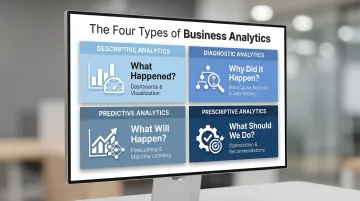
The most capable AI platforms operate across all four layers simultaneously. That full-stack coverage is what separates genuine decision-support tools from glorified dashboards.
The Business Case for AI Analytics
A 2025 McKinsey survey found that 78% of organizations now use AI in at least one business function, and 71% regularly use generative AI. Yet nearly two-thirds remain in the experimentation or piloting phase and haven't scaled it across the enterprise.
Gartner predicts that 40% of enterprise applications will integrate task-specific AI agents by the end of 2026, up from less than 5% in 2025. For companies that act now, that gap is the competitive advantage — faster decisions, earlier opportunities, and market responses before rivals catch up. The tools covered below represent the current best options for closing that gap.
15 AI Tools for Business Analytics
Each tool below was evaluated on AI capability depth, integration breadth, security standards, scalability, and fit for both technical and non-technical users — spanning governed self-service analytics, AutoML, embedded analytics, and cloud-native BI.
Sylus
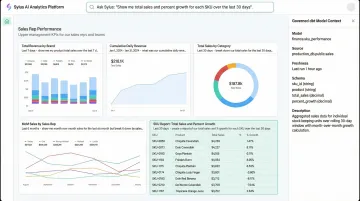
Sylus is an AI analytics platform that connects directly to your data sources and lets teams ask questions in plain English. It functions as a built-in AI data analyst that explores data, validates assumptions, and returns verified answers grounded in your dbt models and documentation.
What sets Sylus apart is its governed context—all analysis is anchored to business-approved definitions rather than generic AI guesses. The platform supports unlimited seats with usage-based pricing, offers SOC 2 Type II and HIPAA compliance, self-hosted deployment, and allows teams to query data directly from Slack or receive AI-generated summaries on a schedule.
| Feature Category | Details |
|---|---|
| Key Features | Governed AI analysis on dbt models; plain-English queries; auto-generated dashboards; Slack integration; scheduled AI summaries; alerts on data spikes; 500+ pre-built integrations |
| Best For | Data teams at fast-growing startups and F1000 enterprises that need governed, self-service analytics without writing SQL |
| Pricing | Usage-based with unlimited seats; contact sales for specific pricing based on estimated usage |
Microsoft Copilot for Power BI
Microsoft Copilot for Power BI is Microsoft's AI layer embedded within its Power BI platform. It allows users to generate reports, create DAX measures, summarize insights, and ask natural language questions within the Power BI environment.
Note that Copilot requires dedicated capacity rather than just per-user licenses—organizations must have a paid Fabric capacity (F2 or higher) or Power BI Premium capacity (P1 or higher) to use Copilot features.
| Feature Category | Details |
|---|---|
| Key Features | NLP report generation; AI-powered summaries; DAX formula suggestions; integration with Microsoft 365 ecosystem |
| Best For | Organizations already invested in Microsoft infrastructure seeking AI augmentation without adding a new platform |
| Pricing | Power BI Pro at $14/user/month or Premium Per User at $24/user/month, plus required Fabric capacity (F2+) or Premium capacity (P1+) |
ThoughtSpot
ThoughtSpot is a search-driven analytics platform built around a natural language query interface. Users type business questions and receive auto-generated charts and answers from connected data sources without building dashboards manually.
The platform's SpotIQ feature uses AI to detect anomalies and surface insights proactively, helping teams discover patterns they weren't specifically looking for.
| Feature Category | Details |
|---|---|
| Key Features | Natural language search; AI-powered SpotIQ anomaly detection; embedded analytics; liveboards; cloud-native architecture |
| Best For | Business users who need self-service analytics at scale without relying on a BI team for every question |
| Pricing | Essentials: $25/user/month; Pro: $50/user/month; Query-based: $0.10/query; Enterprise: Custom pricing |
Tableau AI (Tableau Pulse)
Tableau Pulse is Salesforce's AI-powered evolution of Tableau. It proactively surfaces insights to users through natural language digests instead of requiring users to log into dashboards, embedding analytics into daily workflows.
Advanced AI features like Enhanced Q&A require the Tableau+ bundle, which consumes Salesforce Data 360 credits for AI usage and audit trail storage.
| Feature Category | Details |
|---|---|
| Key Features | Proactive AI-generated metric digests; Einstein AI integration; natural language summaries; Salesforce CRM data connectivity |
| Best For | Salesforce-centric organizations or existing Tableau customers looking to add AI-driven proactive insights |
| Pricing | Standard: $15/user/month; Enterprise: $35/user/month; Tableau+: Contact sales (Pulse included in all tiers; premium AI features require Tableau+) |
DataRobot
DataRobot is an automated machine learning (AutoML) platform focused on enabling business analysts and data scientists to build, deploy, and monitor predictive models without deep ML expertise.
The platform automates feature engineering, model selection, and hyperparameter tuning, allowing teams to deploy predictive models into production quickly.
| Feature Category | Details |
|---|---|
| Key Features | AutoML model building; automated feature engineering; model monitoring and drift detection; MLOps capabilities |
| Best For | Teams that need to build and operationalize predictive models quickly without a large data science headcount |
| Pricing | Enterprise-focused pricing; not publicly listed; 14-day free trial available |
H2O.ai
H2O.ai is an open-source machine learning platform that offers both an enterprise AI cloud and free open-source tools. It supports automated ML, generative AI features, and large-scale predictive modeling for technical teams.
The open-source H2O-3 and H2O AutoML are available for free, while Driverless AI and H2O AI Cloud are commercial enterprise platforms with quote-only pricing.
| Feature Category | Details |
|---|---|
| Key Features | AutoML (H2O AutoML); Driverless AI for automated feature engineering; open-source availability; LLM/GenAI integration |
| Best For | Data science teams that want enterprise-grade ML capabilities with the flexibility of open-source tooling |
| Pricing | Open-source tier: Free; Driverless AI and H2O AI Cloud: Enterprise quote-only; 21-day free trial available |
Alteryx
Alteryx is a data analytics and automation platform that handles data prep, blending, and predictive analytics through a visual, no-code/low-code workflow designer. Business analysts use it to process complex data from multiple sources without writing code.
The platform's drag-and-drop interface makes advanced analytics accessible to non-technical users while still providing depth for power users.
| Feature Category | Details |
|---|---|
| Key Features | Drag-and-drop analytic workflows; predictive and spatial analytics; automated ML; data prep and blending |
| Best For | Business analysts who need to prep, analyze, and model data from multiple sources without deep SQL or Python skills |
| Pricing | Starter Edition: $250/user/month (billed annually); Professional & Enterprise: Contact sales |
Looker (Google Cloud)
Looker is Google Cloud's enterprise BI and analytics platform, built around a semantic modeling layer called LookML. It integrates with Google's AI/ML ecosystem and Gemini AI to support natural language queries and AI-assisted data exploration.
The semantic layer ensures consistent definitions across all analytics, while Gemini in Looker provides conversational analytics and LookML generation capabilities.
| Feature Category | Details |
|---|---|
| Key Features | LookML semantic layer; Gemini AI integration; embedded analytics; real-time data access; Google Cloud native |
| Best For | Enterprises on Google Cloud that need a governed semantic layer with AI-assisted querying and embedding capabilities |
| Pricing | Enterprise quote-only; contact Google Cloud for pricing |
Qlik Sense
Qlik Sense is an associative analytics platform that lets users explore all possible data relationships simultaneously, unlike query-based tools that limit exploration to predefined paths. The AI-powered Insight Advisor surfaces patterns and auto-generates visualizations.
This associative engine allows analysts to click on any data point and instantly see how it relates to all other data in the analysis, revealing connections that traditional query tools might miss.
| Feature Category | Details |
|---|---|
| Key Features | Associative data engine; Insight Advisor AI; NLP queries; augmented analytics; multi-cloud deployment |
| Best For | Analysts who need to explore complex, multi-source data relationships without predefined query structures |
| Pricing | Starter: $300/month (10 users/10GB); Standard: $825/month (25GB); Premium: $2,750/month (50GB); Enterprise: Quote |
IBM Watson Studio
IBM Watson Studio is an enterprise data science and AI platform for building, training, and deploying ML models. Part of the IBM Cloud Pak for Data ecosystem, it's purpose-built for regulated industries like finance and healthcare.
The platform includes AutoAI for automated model building and IBM OpenScale for model monitoring, bias detection, and explainability.
| Feature Category | Details |
|---|---|
| Key Features | Collaborative model development; AutoAI; model bias detection; IBM OpenScale integration; multi-cloud support |
| Best For | Enterprise data science teams in regulated industries that need rigorous governance and explainability in AI models |
| Pricing | Lite plan: Free (limited to 1 user, 10 CUH/month); Professional plan: Pay-as-you-go based on compute usage |
Domo
Domo is a cloud-native BI platform that combines data integration, AI-powered analytics, and business app creation in one environment. Its Magic ETL and AI/ML capabilities allow non-technical users to build and automate analytics pipelines.
The platform uses a credit-based consumption model rather than per-seat pricing, with credits consumed based on data processing, storage, and compute usage.
| Feature Category | Details |
|---|---|
| Key Features | Magic ETL for data prep; AI-powered forecasting; pre-built connectors (1,000+); low-code app builder; real-time dashboards |
| Best For | Business users and operators who need end-to-end analytics from ingestion to dashboard without deep technical resources |
| Pricing | Consumption-based credit model; pay-as-you-go or enterprise packages; 30-day free trial available |
Sisense
Sisense is an analytics platform focused on embedded analytics, enabling companies to build AI-powered analytics features directly into their own products and workflows using an API-first architecture.
The platform's white-labeling and multi-tenant support make it ideal for SaaS companies that want analytics to feel native to their application rather than a third-party add-on.
| Feature Category | Details |
|---|---|
| Key Features | Embedded analytics SDK; AI/ML model integration; cloud-native Fusion architecture; white-labeling; multi-tenant support |
| Best For | SaaS companies and product teams that want to embed analytics capabilities natively into their own applications |
| Pricing | Launch: $399/month; Grow: $1,299/month; Scale: Custom; 7-day free trial available |
Sigma Computing
Sigma Computing is a cloud analytics platform that delivers spreadsheet-like familiarity on top of cloud data warehouses. It offers an AI assistant for query generation and data exploration, making warehouse-scale analytics accessible to non-SQL users.
Users interact with data using familiar spreadsheet formulas and pivot tables, while Sigma translates these actions into optimized SQL that runs directly on the warehouse.
| Feature Category | Details |
|---|---|
| Key Features | Spreadsheet-style interface on cloud data warehouses; AI query assistant; live data access (no extract); governed sharing |
| Best For | Finance and operations teams comfortable with Excel/Sheets who need warehouse-scale analytics without learning SQL |
| Pricing | Not publicly listed; contact sales for pricing |
MicroStrategy AI
MicroStrategy AI is the AI-enhanced evolution of MicroStrategy's long-standing enterprise BI platform. It incorporates generative AI and a cloud-native architecture (MicroStrategy ONE) to deliver natural language query, AI-driven insights, and large-scale enterprise reporting.
The HyperIntelligence feature provides contextual insights directly within applications and web pages without requiring users to open separate dashboards.
| Feature Category | Details |
|---|---|
| Key Features | Generative AI-powered query; HyperIntelligence (contextual in-screen insights); cloud-native ONE platform; large-scale enterprise security |
| Best For | Large enterprises with complex reporting requirements that want AI layered on top of proven BI infrastructure |
| Pricing | Strategy One Standard: Starting at $13/user/month; Enterprise & Government: Quote; 30-day free trial |
Google Looker Studio
Google Looker Studio (formerly Data Studio) is Google's free, web-based BI and reporting tool. It connects to Google products (Analytics, Ads, Sheets) and third-party sources, with AI-powered insights available via Gemini integration in the broader Google ecosystem.
While the core platform is free, third-party partner connectors (such as Supermetrics) require separate paid subscriptions set by the partners.
| Feature Category | Details |
|---|---|
| Key Features | Free to use; 800+ data connectors; Gemini AI integration for summaries; shareable dashboards; Google data source native |
| Best For | Small to mid-sized teams and marketers who need free, shareable dashboards built primarily on Google data sources |
| Pricing | Looker Studio: Free; Looker Studio Pro: $9/user/month (adds team workspaces, SLAs, organization-owned assets) |
How We Chose These AI Analytics Tools
These tools were assessed against criteria that reflect what modern data teams actually need—not just technical capability, but business accessibility, trust, and scalability. Common selection mistakes include choosing tools based on brand recognition alone or failing to evaluate how well the tool handles your specific data infrastructure and user skill mix.
Core Evaluation Criteria
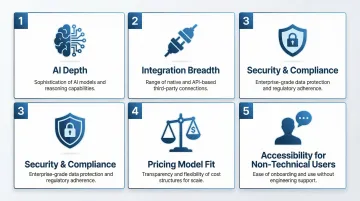
Each tool was scored across five criteria:
- AI depth: Does the platform support true NLP queries, AutoML, predictive modeling, and prescriptive recommendations—or just automated charts? The strongest tools operate across all four analytics layers (descriptive, diagnostic, predictive, prescriptive).
- Integration breadth: Can it connect to your existing stack on day one? Look for pre-built connectors to Snowflake, BigQuery, and Redshift, plus support for dbt model layers. Integration depth varies widely by tool, so verify connector availability before committing.
- Security and compliance: Enterprise-grade platforms hold SOC 2 Type II and ISO 27001 certifications, support self-hosted or private cloud deployment, and enforce role-based access. Sylus adds HIPAA compliance and an explicit no-training policy on customer data—important for regulated industries.
- Pricing model fit: The market splits between predictable seat/capacity models (Qlik, Alteryx) and consumption-based pricing (Domo, ThoughtSpot). Before committing, model your actual query volumes and data scale to forecast costs accurately—per-seat pricing can become expensive fast as teams grow.
- Accessibility for non-technical users: We prioritized tools that let business stakeholders ask questions directly, without routing every request through the data team. Platforms with governed natural language interfaces give every team member direct access to data insights without relying on data engineers, while AutoML platforms (DataRobot, H2O.ai) remain best suited for technical teams.
Matching Tools to Team Profiles
The right tool depends on who's actually using it:
- Data science-heavy teams: Prioritize AutoML and MLOps capabilities — DataRobot and H2O.ai lead here
- Business-user-led teams: Need governed self-service platforms — Sylus and ThoughtSpot fit this profile
- Product teams embedding analytics: Focus on API-first architecture — Sisense is built for this use case
Validation of these criteria can be cross-referenced against current analyst research, including Gartner's 2025 Magic Quadrant for Analytics and Business Intelligence Platforms and Forrester's 2025 Wave for Business Intelligence Platforms.
Conclusion
Choosing the right AI analytics tool comes down to fit: your data infrastructure, your team's skill set, your compliance requirements, and the decisions you need to make faster.
Evaluate each tool against your actual workflows. The right platform should:
- Connect to your existing data sources on day one, without lengthy migration work
- Scale across your user base without per-seat pricing walls
- Let non-technical stakeholders query data independently, so the data team isn't a bottleneck
- Hold security certifications that match your industry's compliance requirements
- Automate genuine insight generation — not just wrap a chatbot around traditional BI reports
If your team needs a governed AI analytics platform that works for everyone—from data engineers to business leads—Sylus was built exactly for this. It connects to your data sources, grounds every answer in your business definitions, and scales across your organization without per-seat limits. Explore how Sylus can give your team a competitive edge.
Frequently Asked Questions
How is AI used in business analytics?
AI is applied in business analytics through machine learning, NLP, and automation. These technologies help teams process large datasets faster, identify patterns without manual querying, and surface actionable insights through natural language interfaces — no SQL expertise required.
What are the 4 types of business analytics?
The four types are descriptive (what happened), diagnostic (why it happened), predictive (what will likely happen), and prescriptive (what action to take). AI tools can enhance all four layers, with the most advanced platforms operating across all types simultaneously.
What is the best AI tool for business analytics?
The best tool depends on your use case and team profile:
- Governed NLP platforms like Sylus suit data teams needing enterprise-grade analytics grounded in dbt models
- AutoML platforms like DataRobot suit teams focused on predictive modeling
- Free tools like Google Looker Studio suit smaller teams with lighter reporting needs
How do AI analytics tools integrate with existing data infrastructure?
Most modern AI analytics tools integrate via pre-built connectors to cloud data warehouses (Snowflake, BigQuery, Redshift), APIs, and semantic/dbt model layers. Integration depth varies significantly by tool — verify connector availability for your specific stack before committing.
Are AI analytics tools secure enough for enterprise use?
Enterprise-grade tools typically hold SOC 2 Type II and ISO 27001 certifications, offer self-hosted or private cloud deployment, and enforce role-based access controls. Some platforms like Sylus also carry HIPAA compliance and explicitly do not train models on customer data — a key requirement for healthcare, finance, and other regulated industries.