Introduction
Most enterprise data sits behind SQL databases, yet studies show only 32% of organizations achieve true self-service analytics. The bottleneck is familiar: business users can't write SQL, and data teams spend up to 70% of their time on routine reports instead of strategic work.
A natural language database query agent closes that gap by converting plain-English questions into SQL, executing them automatically, and returning human-readable answers—no SQL knowledge required from the end user.
Building one sounds straightforward. Results vary dramatically, though, based on four variables: schema context quality, prompt engineering, model choice, and whether error-correction is built in. Public text-to-SQL benchmarks carry annotation error rates exceeding 50%, making model selection riskier than leaderboards suggest. Unoptimized agents routinely hit 24-second cold-start latencies, and many produce confidently wrong SQL that executes silently with incorrect results.
This guide covers the full picture: architecture, accuracy parameters, common failure modes, and when building your own makes sense versus adopting an existing solution.
Key Takeaways
- A natural language database query agent converts plain-English questions into SQL, executes them, and returns human-readable answers without requiring SQL knowledge from users
- Core components: a database connection with schema metadata, an LLM, a prompt template, and a query execution + result-formatting layer
- Accuracy depends on schema documentation quality, prompt specificity, and self-correction loops — which improve execution accuracy by 2-13%, not the commonly cited 60-80%
- Common failure points: token overload from large schemas, hallucinated SQL that executes with wrong results, and cold-start latencies up to 24 seconds
- For teams that don't want to engineer and maintain a custom agent, governed managed solutions like Sylus handle context, compliance, and multi-source querying without custom engineering
How to Build a Natural Language Database Query Agent
Step 1: Connect to Your Database and Extract Schema Metadata
The LLM needs schema context—table names, column names, relationships, and sample rows—to generate accurate SQL. Without it, the model is guessing. Schema metadata is the foundation that separates a functional agent from one that produces plausible-looking but incorrect queries.
Create a database connection object using frameworks like LangChain's SQLDatabase or direct connectors (pymysql, psycopg2). Configure which tables to expose through an include list. Limiting tables reduces token usage and restricts access to sensitive data. Be strategic, though — excluding relevant tables causes incorrect queries.
Trade-offs of controlling metadata scope:
- Too little context causes hallucinated column names and broken joins — the LLM simply lacks what it needs
- Too much context exceeds token limits or dilutes focus across irrelevant tables
- The right balance: filter to relevant tables, cap sample rows at 3-5 per table, and use database views to consolidate normalized schemas
Research shows bidirectional schema linking can reduce input columns by 83% (from 76 to 13 columns on average) while maintaining 92% recall, improving both accuracy and speed.
Step 2: Configure Your LLM and Prompt Template
The prompt template is where you inject business logic the LLM can't infer from schema alone — multi-tenancy rules, naming conventions, preferred query patterns, column disambiguation. It's the only channel through which domain knowledge reaches the model.
Structure an effective prompt:
- Include the natural language question as an input variable
- Add schema-specific instructions (e.g., "always filter by tenant_id for customer queries")
- Specify output format expectations (e.g., "return only executable SQL, no explanations")
- Clarify data rules and business logic explicitly
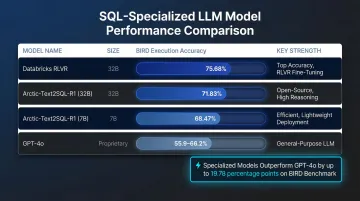
Model choice affects SQL accuracy on complex queries. Specialized open-weights models trained specifically on SQL now rival or outperform general-purpose LLMs:
| Model | Size | BIRD Execution Accuracy | Key Strength |
|---|---|---|---|
| Databricks RLVR | 32B | 75.68% | State-of-the-art via reinforcement learning |
| Arctic-Text2SQL-R1 | 32B | 71.83% | Outperforms proprietary models on BIRD |
| Arctic-Text2SQL-R1 | 7B | 68.47% | Matches 70B models at 1/10th the size |
| GPT-4o | Proprietary | 55.9-66.2% | Strong generalist, beaten by specialized models |
For complex queries involving multiple joins and subqueries, the performance gap between frontier models and older baselines widens considerably. Fine-tuned GPT-3.5 achieves 94% accuracy on easy queries but drops to 56.6% on extra-hard queries.
Step 3: Build the Query Generation and Execution Chain
The chain works end-to-end: prompt + schema metadata → LLM generates SQL → SQL executes against the database → raw results are returned. Wire this together using LangChain's SQLDatabaseChain or a custom orchestration layer. During development, enable verbose/debug mode — silent errors, where syntactically valid SQL executes but returns wrong results, are harder to catch than explicit failures.
Critical execution requirements:
- Read-only database credentials
- Query timeout limits (prevent long-running queries from blocking)
- Row count limits (cap results at 1,000-10,000 rows)
- Connection pooling with health checks to avoid stale connections
Step 4: Add a Self-Correction Loop and Result Formatting Layer
LLMs can produce syntactically plausible but semantically wrong SQL. A correction loop catches execution errors and feeds them back to the LLM with the error message to regenerate the query.
Self-correction flow:
- Execute query against database
- If the database returns an error, pass the error message + original question + failed SQL back to the LLM
- Request a corrected query with explicit instructions referencing the error
- Re-execute the corrected query
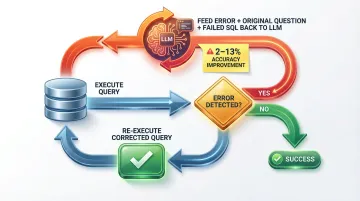
Measured gains from self-correction: Research shows self-correction provides a 2-13% absolute boost in execution accuracy, not the widely cited 60-80% recovery myth. Test-driven self-refinement (TS-SQL), which generates synthetic test data and validates SQL outputs against expected results, outperforms generic self-correction by at least 6%.
Result formatting step: Pass raw query results back through the LLM with the original question to produce a natural language answer — not just a data dump. This final step transforms technical output into business insights users can act on.
What You Need Before You Start
Poor preparation is the most common reason these agents fail — not the LLM, not the framework.
Infrastructure and Access Requirements
Minimum requirements:
- Database access credentials (read-only strongly recommended)
- LLM API access (OpenAI, Anthropic, or self-hosted model)
- Python environment with relevant libraries (LangChain, SQLAlchemy, or equivalent)
- Optionally, a metadata catalog if working with a data warehouse
For cloud data warehouses, ensure you have actively maintained SQLAlchemy 2.x dialects. Snowflake, BigQuery, Redshift, and most major warehouses have supported dialects — check compatibility before building, since dialect versions can lag behind warehouse updates.
Schema Readiness and Documentation Quality
Schema quality is the biggest lever on accuracy. The LLM cannot infer business meaning from column names like col_a or tbl_v3 — and it won't tell you it's guessing.
Schema documentation best practices:
- Use descriptive table and column names that reflect business meaning
- Add column descriptions explaining what each field represents
- Include sample rows (3-5 per table) to show data formats
- Document relationships and foreign keys explicitly
- Define business rules (for example, "revenue excludes refunds")
Security and Compliance Readiness
The agent executes SQL against live databases — which makes security configuration non-negotiable. Before connecting any production data:
- Use read-only credentials (never write access)
- Sandbox query execution to prevent destructive operations
- Exclude sensitive tables from the schema context entirely
Compliance requirements:
- HIPAA: Any AI vendor processing ePHI requires a Business Associate Agreement (BAA) and audit controls to record all prompts and SQL outputs
- SOC 2: Enforce strict access controls, use short-lived temporary credentials (like AWS IAM database authentication), and encrypt prompt/completion logs with KMS keys
- OWASP LLM01: Defend against prompt injection by validating generated SQL before execution and using parameterized queries
Key Parameters That Affect Query Accuracy
Even with correct setup, output quality is controlled by a handful of tunable variables. Understanding these prevents the most common accuracy failures.
Schema Context Scope
The LLM can only generate SQL for tables and columns it knows about — incomplete or cluttered schema context is the #1 cause of inaccurate queries. Broad, undocumented schemas cause the model to hallucinate column names or join on incorrect keys.
Narrower, well-documented context fixes this. Bidirectional schema linking reduces input columns by 83% while maintaining 92% recall.
Prompt Specificity and Business Rules
The prompt is the only channel through which domain knowledge reaches the LLM. Prompts that specify filtering rules, naming conventions, and expected output format produce more consistent results than bare-question prompts.
Include explicit instructions such as "always filter by tenant_id" or "exclude refunded transactions from revenue calculations."
Self-Correction Loop Depth
A single generation pass will fail on complex queries involving multiple joins, subqueries, or ambiguous column references. Adding a correction loop changes that.
Agents that feed database error messages back to the LLM recover from execution errors with a 2–13% absolute accuracy improvement. Test-driven self-refinement — which validates SQL against synthetic test data — outperforms generic self-correction by 6%.
Token Budget Management
Large schemas can exceed LLM token limits, causing truncation or API errors. Even with frontier models offering 1M token windows, dumping thousands of irrelevant columns introduces noise and drives up costs.
Three approaches keep the agent within budget without sacrificing accuracy:
- View creation — expose only relevant columns to the model
- Table filtering — select candidate tables before passing schema context
- Sample row limits — cap the number of example rows per table
Schema pruning frameworks using these techniques achieve 96.2% precision and 97.4% recall on table selection.
Common Mistakes and How to Troubleshoot Them
Even well-architected agents fail in predictable ways. The failures tend to cluster around the same root causes: under-specified prompts, missing security controls, and unhandled edge cases at runtime.
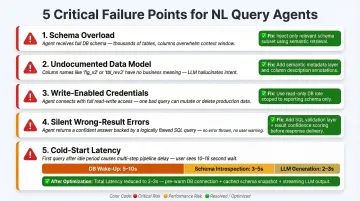
Here are the five most common failure points — and how to fix each one.
Passing the full schema without filtering. Token limits get hit fast, and a bloated schema dilutes the LLM's focus. Use
include_tableslists or views to expose only relevant tables, and cap sample rows at 3-5 per table.Assuming the LLM understands your data model. It doesn't — unless you tell it. Document column meanings, business rules, and example question-to-SQL mappings directly in the prompt.
Using write-enabled credentials. A generated query can accidentally execute a
DELETEorUPDATE. Enforce read-only database credentials and validate that generated SQL contains no DDL or DML write operations before execution.No validation for queries that execute but return wrong results. Silent errors are worse than explicit failures. Implement result checks — expected row count ranges, cross-checks against known metrics — and expose the generated SQL to power users for verification.
Ignoring cold-start latency. First queries can take 10-30 seconds due to schema loading and multi-step LLM calls. The breakdown typically looks like this:
- 5-10 seconds: database wake-up
- 3-5 seconds: schema introspection
- 2-3 seconds: LLM generation
Fix by caching schema metadata with a 1-hour TTL, pre-warming connections on application startup, and setting user expectations with progress indicators. These three changes alone can drop first-query latency from ~24 seconds to 2-3 seconds.
When to Build vs. Buy: Alternatives to Consider
Building a custom NL query agent is the right choice when you need deep integration with proprietary systems, a bespoke UI, or full control over the model and data pipeline. But for most data teams, the engineering and maintenance overhead outweighs the benefits.
Build your own when:
- You have complex, non-standard database topologies that managed tools don't support
- You need on-premise LLM deployment due to data residency requirements
- You require deep customization of the query pipeline that no managed tool supports
- You have dedicated engineering resources to maintain prompt engineering, schema management, and security infrastructure
Use a managed platform like Sylus when:
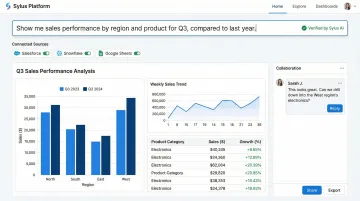
Your team needs production-ready NL querying without owning the prompt engineering, schema management, and security infrastructure yourself. Sylus is built for exactly this scenario:
- Connects to 500+ data sources through one-click integrations
- Grounds all analysis in your dbt models and documentation for governed context
- SOC 2 Type II and HIPAA compliant, with self-hosted deployment available
- Takes teams from question to verified dashboard without writing SQL
- Supports multi-source querying and metric verification through team collaboration workflows
- Queries data directly from Slack; schedules reports and AI-generated summaries to email or Slack
- Unlimited seats priced on usage rather than per user
Consider a hybrid approach if:
Data residency rules prevent using external APIs but you still want a managed interface layer. Self-hosting an open-source LLM covers the compliance gap — though weigh that against the operational cost of running and fine-tuning models internally. Specialized 7B–32B models like Arctic-Text2SQL-R1 can match 70B model performance at one-tenth the parameter count, which meaningfully reduces infrastructure costs.
Frequently Asked Questions
What is a natural language database query agent?
A natural language database query agent is an AI system that accepts plain-English questions, translates them into SQL using an LLM, executes the query against a connected database, and returns a human-readable answer. End users don't need SQL knowledge—they simply ask questions like "What were total sales last quarter?" and receive formatted results instantly.
Do I need to know SQL to build or use an NL database query agent?
End users don't need SQL knowledge to use the agent. However, the developer building the agent should understand SQL and database structure to configure schema context, write effective prompts, and validate generated queries are correct. Without that foundation, troubleshooting incorrect queries and tuning performance becomes guesswork.
How accurate are AI-generated SQL queries from natural language inputs?
Accuracy depends on schema documentation quality, prompt specificity, and model capability. Simple queries on well-documented schemas reach 90%+ execution accuracy, while complex multi-join queries benefit from self-correction loops (2-13% improvement) — and specialized models like Arctic-Text2SQL-R1 push execution accuracy to 71.83% on complex benchmarks, outperforming general-purpose models.
What databases are compatible with NL query agents?
Most SQL databases — PostgreSQL, MySQL, Snowflake, BigQuery, Redshift, and others — are supported via SQLAlchemy connectors. Frameworks like LangChain abstract the compatibility layer, so connecting to any database with an active SQLAlchemy 2.x dialect is straightforward.
How do I prevent the agent from running dangerous or destructive SQL queries?
Use read-only database credentials, implement pre-execution SQL validation to block DDL/DML write operations (CREATE, DROP, UPDATE, DELETE), and execute queries in sandboxed environments. Parameterized queries prevent SQL injection, and least-privilege access ensures the agent can only read the specific tables required for analytics.
What is the difference between text-to-SQL and a full NL query agent?
Text-to-SQL refers specifically to the translation step (natural language → SQL). An NL query agent is the full system: it handles schema context management, SQL generation, query execution, error correction, and result formatting into a human-readable answer. In short, text-to-SQL is one component — the agent is the entire pipeline.